Do you want to buy a digital product quickly but get stuck at the login stage? Or are you unsure how to create an account? This guide will answer these questions. The Baxity Store is a leading platform for instant purchases. We will explain the entire process in detail, starting with how to log in to Baxity Store and moving on to using your personal dashboard. You will learn the correct and secure way to access your user account. Our goal is to give you fast access to products, saving your time and nerves. Visit the official website - Baxity Store - to apply this knowledge right now.
How to Create an Account on Baxity Store
A personal account is your key to all platform features. Registration is a mandatory step that includes several stages for your security. Baxity Store uses a standard yet secure model: one account — one dashboard where all your purchases, settings, and activity history are stored. Access to your favorite digital products should be simple and fast. The account creation process is straightforward and not overloaded with unnecessary requirements. To sign up for the Baxity Store, you just need to visit the website. The process works equally in your browser and on mobile devices, taking just a few minutes. This guide will show you how to create an account on Baxity Store and pass all the necessary checks. These steps will allow you to register on Baxity Store securely, ensuring reliable authentication, quick confirmation, and fast access to products.

Step-by-Step Registration Process
Follow these steps closely to successfully create your account and log in for the first time.
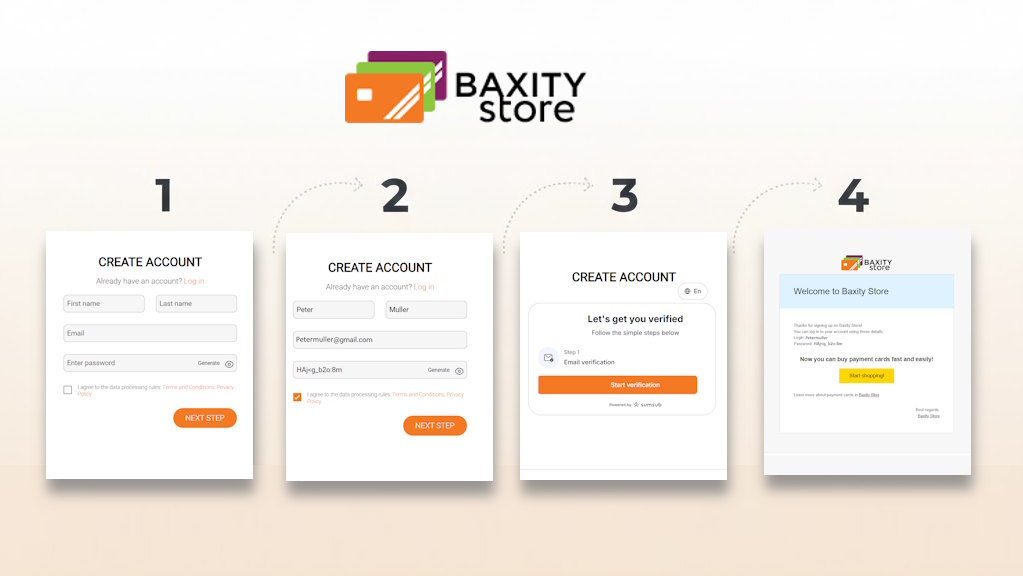
- Initiate the Sign-Up. On the Baxity Store homepage, click the "Sign Up" button. You will be redirected to the registration form.
- Fill Out the Registration Form. Enter your First name and Last name. Provide a valid Email address and create a strong Password. You can use the "Generate" button to let the system create a secure password for you automatically. Remember to save this password securely. Agree to the data processing rules and click the "NEXT STEP" button.
- Verify Your Email Address. On the next screen, click "Start verification". The system will send a "Welcome to Baxity Store" email to your inbox. This email contains your Login username and Password for access. This email confirmation is only the first stage.
- Log In with Two-Factor Authentication (2FA). After email confirmation, you will be redirected to the login page. Enter the Login and Password from the email and click "LOG IN". The system will immediately send you a new email with a 6-digit security code. Enter this code in the corresponding field on the website to complete the login. This two-factor authentication (2FA) is used to enhance security for every login attempt.
Once you have registered on Baxity Store, you will have access to your account dashboard. To access all features, such as making purchases, full account verification will be required. This is also a straightforward process, which we will cover in the following sections.
Information Required for Registration
The registration form collects minimal but essential information to set up your Baxity Store account. Here is what you need to provide:
- Personal Details: Your legal First Name and Last Name.
- Primary Contact: One valid email address. This is the most critical piece of information. All security codes, login details, and receipts are sent here.
- Account Security: A strong Password. You can create your own or use the system's "Generate" function.
Important Security Note: The process involves multiple confirmation and authentication steps via email. This two-factor (2FA) system ensures a high level of security for your account and future transactions on the platform.
Baxity Store Login and Account Access
Any action on the platform, from viewing your personal dashboard to purchasing a digital card, requires your authorization in the system. This is not just a formality — it is the foundation of your security. Every log in to your Baxity Store account protects your transactions and personal data. The login procedure is designed to be both secure and fast. Whether you access it from a desktop or a mobile phone, it will only take a few minutes. Consider this guide your main instruction for logging into Baxity Store. It will break down each step in detail and also explain how full verification unlocks the full potential of your account.
Completing Your User Account Login
Follow these steps to access your account securely. Make sure you have the email address associated with your account ready, as all security codes are sent there.
- Navigate to the Login Page.Go to the Baxity Store website and click the "Log in"
- Enter Your Credentials.On the login page, enter the Login and Password for your account.
- Complete Two-Factor Authentication (2FA).After clicking "Log In", the system will immediately send a new email with a 6-digit security code. Check your inbox and enter this code in the designated field on the website.
- Access Your Dashboard.After entering the correct code, you will be granted access to your personal dashboard.
What if you don't receive the code? Check your spam folder. If it's not there, you can click the "Send again" link on the login page to request a new one.
Main Interface and Actions in the Dashboard
After logging in, you will enter your Personal Account. Management is done through three main sections:
- Orders:View the history and status of all your purchases.
- Settings:The control center for your profile. Here you can change your password, account currency, and complete verification.
- Bonuses:Information about your bonus program and accruals.
Account Verification: From Standard to Full
After you sign up for Baxity Store and register your account online, your account will receive a standard verification status. This minimum level includes confirmation of your email, name, and currency. It is sufficient for browsing the catalog and making basic purchases. However, to unlock all the platform's capabilities and get better terms, it is recommended to complete full verification.

Full Verification: The Key to Advanced Features
If standard verification provides basic access, then full verification unlocks full-fledged access to Baxity Store. This is your personal key to better terms. Why do it? Here are your benefits:
- Significantly Higher Limits:By verifying your identity, you gain access to purchases for much larger amounts.
- Expanded Choice of Payment Methods:Access to all payment methods available on the platform.
- Priority Support and Security:Your account becomes a priority for support, and protection is maximized.
- Trust from the Platform:Access to closed promotions and special offers.
How does it work? (Process in the Settings section):
- Document:Provide a scan of your passport, driver's license, or ID card.
- Liveness Check: A short video confirmation via camera.
Logging Out: To protect your Baxity Store account, especially when using a shared or public desktop, always remember to log out by clicking the "Log out" option in your profile menu.
Baxity Store Products and Account Usage
Baxity Store offers one of the widest online catalogs of digital cards, where every item is a guaranteed original product. The platform is constantly evolving: the assortment is updated, local payment methods are added, and the interface is refined to meet every customer's needs. Your Baxity Store account online is your personal gateway to this world of digital possibilities and a tool for convenient use. Creating your Baxity Store account is the first step to gaining all the benefits.
Access to Digital Products
Once you complete the registration for your online account and log into your online account on Baxity Store, you gain access to the full range of digital products on Baxity Store. For your convenience, all offers are clearly structured by category:
| Category | Description | Digital Products on Baxity Store |
|---|---|---|
| Gift Cards | Digital certificates for popular retail, tech, and entertainment brands | Binance, Gate.io, App Store & iTunes, Google Play, Amazon, eBay Gift Card, Netflix |
| Prepaid Cards | Virtual payment solutions for secure online transactions | Visa Gift Prepaid Cards, Visa Prepaid, Mastercard Virtual, American Express, ICash.One Voucher (ex Astropay), Razer Gold, Flexepin, Paysafecard, Prepaidy Cards, Neosurf, Gift Me Crypto Voucher |
| Gaming Credits | Instant top-up for popular gaming platforms and services | Steam, PlayStation, Xbox, Nintendo eShop, Free Fire, Fortnite, PUBG Mobile, Yalla Ludo Diamonds, Roblox, EA Play, Minecraft |
| Promo | Current bonuses, promo codes, and special offers | Bonus codes, seasonal discounts, special promotions |
| Wholesale | Bulk purchases with individual terms and pricing | Custom discounts, priority processing, 24/7 support for large orders |
Account Features for Customers
Your personal dashboard is not just a window to the catalog but a powerful management tool. The Baxity Store account you created becomes the control center for all your digital products from Baxity Store. Currently, it offers the following key features:
- Viewing History and Statuses: In the Orders section, you can always view the detailed history of all your purchases, track the status of current orders, and instantly find received product codes.
- Profile and Verification Management: The Settings section is the control hub. Here you can change your password, account currency, and manage your verification level.
- Access to Favorable Terms: Baxity Store values its regular customers. Through your account, you gain access to ongoing discounts and special wholesale pricing for large orders.
- Future Bonuses: The platform is actively developing a bonus program for its users. Updates and new features will become available directly in your personal account.
Your Baxity Store account is a dynamic tool that ensures the security of your transactions, provides management convenience, and opens the door to advantageous offers in the digital products market.
Password Management and Recovery
Full control over your account includes the ability to manage its primary key — your password. Whether you need to update it regularly for security or urgently regain access if you've forgotten it, the process should be clear and quick. Our guide to logging into Baxity Store provides precise instructions for both situations, ensuring the protection of your privacy.
How to Reset a Forgotten Password
If you have forgotten the password needed to log in to your Baxity Store account as a customer, follow this simple process:
- On the login page, click the "Lost your password?" link.
- Enter the email address or username associated with your account.
- Click the "Send" button.
- Check your email. You should receive a message titled "Password Reset Request for Baxity Store" within 10 minutes. If the email is not in your inbox, check your "Spam" or "Junk" folder.
- In the email, click the password reset link and set a new strong password.
How to Change Your Password in Your Personal Account
If you have already logged into your Baxity Store customer account and want to proactively update your password:
- Go to the Settings section of your personal dashboard.
- Find the option to change your password.
- Follow the on-screen instructions to enter your current password and create a new one.
Important Security Note: After changing your password, you cannot use the old password again. This policy is in place to enhance the protection of your account. Always create a completely new and unique password.
What to Do If the Reset Email Doesn't Arrive?
If you did not receive the password recovery email after your request:
- Make sure you entered the correct email address associated with your Baxity Store account.
- Carefully check the "Spam", "Promotions", or "Junk Mail" folders in your email service.
- If the issue persists, contact Baxity Store's customer support for assistance.
In summary: Regularly updating your password and knowing how to quickly recover it are key skills for the secure use of Baxity Store. Use strong, unique passwords and keep your email address up to date.

Account Security and Personal Data Protection
The protection of your account begins with your registration on Baxity Store and is reinforced with every secure login to your account. Security is a result of collaboration: the platform's powerful technologies and your conscious actions.
How Baxity Store Protects Your Data
The platform employs a set of measures:
- Two-Factor Authentication (2FA): The primary security mechanism, requiring an email code for every login.
- Data Encryption: All confidential information is protected by modern encryption algorithms during transmission and storage.
- Secure Transactions: Payment operations are conducted through secure protocols and verified partners.
Your Role: Simple and Effective Steps
Protection is enhanced by your actions. Adhere to these key rules:
- Create and update strong passwords. Use unique combinations.
- Complete full verification. This unlocks features and raises your protection level.
- Be cautious. Never share your login credentials and always log out on shared devices.
Together, these measures create a reliable foundation for safely working with digital products.
Account Limitations and Support Options
An account on Baxity Store is created for personal use and for correct access to digital products. To avoid access restrictions or delays, it helps to understand the basic account rules and to know when you should contact customer support. In most cases, access issues are not caused by technical failures but by simple violations of account usage rules. Keep the following points in mind:
- the account is intended for personal use and should not be shared with other people;
- it is not recommended to create multiple accounts using the same email address;
- during login and purchases, always use accurate and up-to-date information;
- attempts to bypass confirmation or verification steps may result in temporary limitations;
- until all required checks are completed, some account features may remain unavailable.
These restrictions are there to protect user accounts and digital products, not to make the platform harder to use. When you sign up on Baxity Store, use your own email address and personal details so you can confirm access and avoid problems with your account later.
Where to find answers to common questions
Baxity Store has a dedicated Help section with answers to the most common topics, including registration, email confirmation, account access, and other typical situations. In many cases, it is enough to resolve an issue in a few minutes. If you cannot find an answer to your question or your case needs individual review, simply contact customer support. The Baxity Store team is always ready to help and guide you on what to do next.
FAQ
How can I quickly create a user account on Baxity Store?
The process takes a few minutes. You need to fill out a short form to complete your registration on Baxity Store, confirm your email, and log in with the security code. See the detailed guide in the "How to Create an Account" section.
Can I register my account online from my phone?
Yes, the process to register your account online is fully optimized for mobile devices. You can create a Baxity Store account using the browser on your smartphone or tablet.
How do I log in to Baxity Store from a new device?
The login process remains the same. On a new device, simply go to the website, enter your login and password, and then enter the 6-digit security code sent to your email.
What should I do if I don't receive the login code?
First, check your "Spam" or "Promotions" folder. If the email isn't there, ensure you are entering the correct email address. The issue might be due to temporary email service delays.
Can I buy a Paysafe card on Baxity Store?
Yes, of course. Paysafe cards are one of the most popular categories in the Prepaid Cards section. After logging into your account, you can choose the desired denomination and purchase it quickly.
Is it safe to save card details in the account?
Baxity Store does not store your payment card details for future purchases. Each transaction is processed separately through secure payment gateways, ensuring an additional layer of security.
Comments
Sign in to join the conversation. Every comment is reviewed before it appears on the page.
Sign in to comment
You need an account to leave a comment. Sign in and your name will be used automatically.
No comments yet. Be the first to write one.