You use Binance Pay and play on PlayStation. Combining these seems logical, but it’s not that straightforward. The Baxity Store team sees questions from gamers every day: how exactly do you top up PSN with Binance Pay when direct crypto payments aren’t available? The issue is that there are plenty of shady middlemen online where even experienced players overpay or risk losing their money.
We’ve prepared a clear guide for both beginners and those who already use cryptocurrency regularly. You’ll learn how paying for PlayStation purchases with Binance Pay works, which top-up methods are actually convenient, and (spoiler) why PSN gift cards purchased with Binance Pay from an official reseller remain one of the most reliable options for fast digital purchases. We’ll also tell you about the favorable terms for those who buy regularly. Read to the end so you don’t overpay and always have your games ready.
Binance Pay for PlayStation Purchases
Binance Pay is a cryptocurrency payment service within the Binance ecosystem, launched in 2021 by the Binance exchange (founder — Changpeng Zhao). The service lets users pay for goods and services directly from their crypto wallet. No bank cards, no SWIFT transfers. Simply select Binance Pay at the merchant’s checkout, scan a QR code, and confirm the payment in the app.
Binance Pay’s transaction volumes are impressive. As of 2025, Binance Pay has processed hundreds of billions of dollars in transactions. The service supports over 70 cryptocurrencies, including USDT, BNB, BTC, ETH, XRP, and even Dogecoin. More than one million transactions go through it every month. And this keeps growing each year.
Interest in crypto payments for PlayStation via Binance is rising, especially among users who already actively use cryptocurrency and want to use one payment ecosystem for various digital purchases:
- Because banks often block payments to gaming stores.
- Because credit cards don’t always work abroad.
- Because PayPal has country-specific restrictions.
Binance Pay bypasses all these obstacles. You can use it regardless of your location. It doesn’t block “suspicious” payments. It simply processes the transaction in seconds.
- Fees and speed.Binance Pay doesn’t charge a percentage on payments. You only pay the blockchain’s network fee (gas). or USDT on the BEP-20 network, the fee is usually around $0.05–$0.10. For comparison, Visa/Mastercard charge 2–4% of the amount plus currency conversion. A transaction via Binance Pay takes 5–15 seconds for most networks. A bank transfer between countries takes 1–5 days.
- You never share your card details, CVC code, or address. The payment is confirmed in your app via Face ID, Touch ID, or PIN code. Even if the merchant’s site gets hacked, your financial data stays safe because you never left it there.
That’s why the topic of Binance Pay for the PS Store keeps gaining popularity among gamers who regularly buy digital content and use crypto for online payments. Next, we’ll look at whether direct PSN top-ups via Binance online actually exist.
Can You Pay on PlayStation Store with Crypto
No, the PlayStation Store does not support direct cryptocurrency payments. You cannot select Binance Pay in the PS Store. There’s no way to link a crypto wallet to your PSN account. Sony has no integration with any blockchain.
Why doesn’t Sony accept crypto payments? The company has never provided an official explanation, but industry experts usually point to several key reasons:
- High cryptocurrency volatility makes refunds and charge adjustments more complicated.
- Financial regulations differ significantly from country to country.
- Transaction security remains a major concern, especially when it comes to wallet hacks or crypto-related fraud.
- Integrating dozens of different blockchain networks would create significant technical complexity.
That’s why crypto users typically buy PlayStation gift cards through external sellers that support crypto payments. After payment, the user receives a gift card or PSN code via Binance, activates it in their account, and tops up their balance the usual way.
Today, this is how most users top up PSN through Binance for users who want to pay for digital purchases with cryptocurrency. Meanwhile, the topic of Binance Pay for the PS Store continues to gain popularity, even though there’s still no direct crypto integration in the PlayStation Store.
Why Users Choose Binance Pay for PSN
Interest in PlayStation with Binance Pay continues to grow mainly because of international payment issues. Bank cards may decline transactions in foreign currencies, require additional verification, or simply stop working in certain PS Store regions. For gamers who regularly buy games, DLCs, or subscriptions, this often creates ongoing payment problems.
That is why many Binance users are switching to PSN gift cards instead. This approach removes the need to link a bank card to a PlayStation account, makes it easier to buy top-ups for specific PS Store regions, and gives users better control over their gaming budget.
Why buying PSN gift cards through Binance Pay became so popular:
- support for USDT and other popular cryptocurrencies;
- fast internal crypto transfers within the Binance ecosystem;
- fewer problems with international payment restrictions;
- the ability to buy PSN credits for different regions;
- easier control over spending on digital purchases.
For many users, even a PlayStation payment with USDT becomes possible when buying PSN gift cards from sellers that support cryptocurrency payments. That is why buying PSN online through Binance has already become a common way to top up PlayStation accounts without complicated international payments or banking restrictions.
How to Get PSN Credits Using Binance Pay on Baxity Store
When buying PlayStation gift cards with cryptocurrency, most gamers care about three things: fast delivery, secure payments, and the confidence that the gift card will activate correctly in the required PS Store region. That is why many users choose Baxity Store. The platform works as a verified reseller of digital products, supports cryptocurrency payments, and offers instant digital delivery without long manual order processing.
With Baxity Store, users can quickly buy PSN with Binance Pay, choose a gift card for the required region, and complete the payment directly from their Binance wallet. To improve the security of digital purchases, the platform also uses verification checks that help reduce the risk of fraud and resold or previously activated codes.
Next, we’ll break down step by step how to choose a PSN card online, pay through Binance Pay, and activate the gift card in PlayStation Store.
Select a PlayStation Gift Card
On the main page of Baxity Store, open the Gaming Credits category and go to the PlayStation gift cards online section. The catalog includes different denominations — from PlayStation 1$ PSN US cards to PlayStation EUR 250 FR cards — which makes them convenient both for small account top-ups and for buying new games or adding balance before major releases and seasonal sales. Baxity Store offers gift cards in multiple currencies and regions, including USD, EUR, GBP, TRY, AED, INR, PLN, and other popular PS Store currencies.
When choosing a gift card, it is very important to pay attention to the card’s region and currency. US gift cards only work with US PSN accounts, European cards work with the corresponding EU regions, and so on. Baxity Store clearly displays the currency and region of each card, making it easier for users to avoid activation mistakes.
Baxity Store also regularly runs promotions and seasonal sales on digital gift cards. In addition, users who frequently buy gaming credits or place orders for 10 cards or more can access wholesale pricing and individual purchase conditions. That is why, for many users, a PSN gift card with Binance has become one of the most convenient and cost-effective ways to quickly buy digital gaming credits with cryptocurrency.
Pay via Binance Pay
After selecting the gift card and the required denomination, add the product to your cart and proceed to checkout. If this is your first purchase, you will need to register a Baxity Store account or log in to an existing profile. After that, the platform may request a short verification process — this is an important security step designed to protect users, payments, and digital purchases from fraud.
Next, during checkout, select Cryptocurrency as your payment method, agree to the Baxity Store terms, and click Place Order. The system will then automatically redirect you to the payment page. On the payment page, you need to:
- choose a cryptocurrency from the list of available currencies (for example, USDT);
- select a blockchain network for the transaction (for example, TRC-20);
- check the payment amount and the network fee.
After that, the system will display the Recipient’s wallet address and a QR code for payment. To buy PSN with Binance Pay, open the Binance app, tap “Pay,” and select “Scan.” Scan the QR code shown on the screen, check the payment amount and network fee, then confirm the transaction using Face ID or your PIN code.
The payment usually takes 5–15 seconds to complete. If your goal is a PSN top up with Binance, the funds will be deducted from your wallet immediately after confirmation. Baxity Store receives the payment, and the gift card code is typically delivered to your email within 1–5 minutes.
Use the Received Code
After the payment is confirmed, Baxity Store sends the gift card code to the email address provided during checkout. In most cases, delivery takes between 1 and 5 minutes. How to activate the gift card:
- Open PlayStation Store in your browser or directly on your console.
- Go to the Redeem Codes section.
- Enter the received gift card code.
- Confirm the activation.
After that, the funds are automatically added to your PSN balance and become available for new purchases, subscriptions, or in-game content. This is how most PS Store with Binance Pay scenarios work today, allowing users to buy digital gaming credits with cryptocurrency even though PlayStation Store still does not support direct crypto integration.
Once the gift card is activated, users get instant access to digital purchases and can immediately use their balance for games, DLCs, or PlayStation Plus. For many gamers, PSN with Binance Pay has become one of the simplest ways to quickly recharge an account without banking restrictions.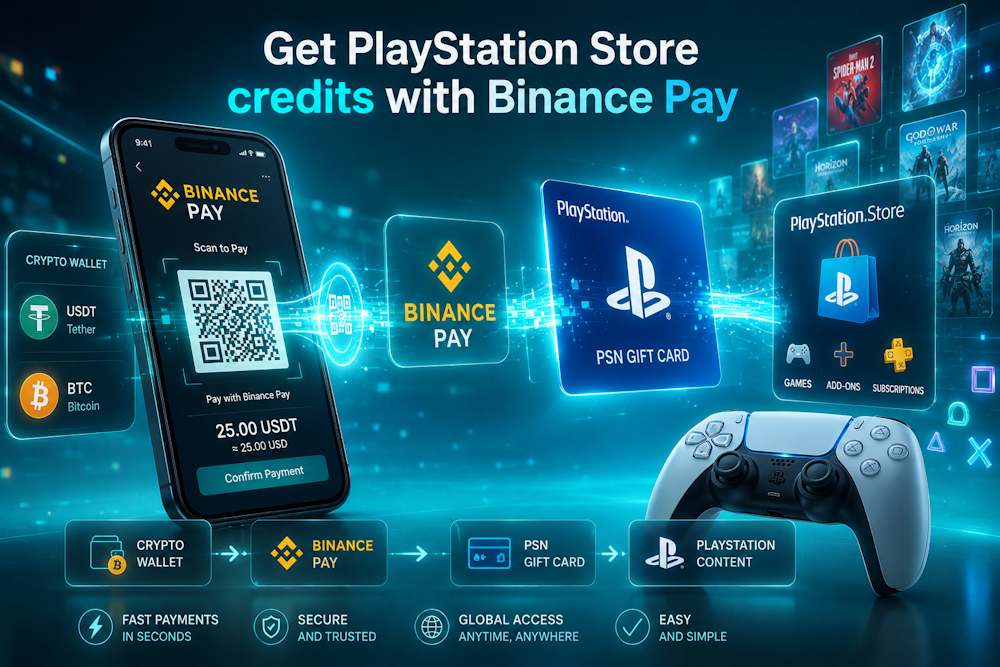
What You Can Buy with PlayStation Store Credits
When you top up your PSN balance in advance, you get access to the entire PlayStation Store catalog — without relying on bank cards or payment restrictions at checkout. You can simply purchase a PlayStation card online, redeem the code, and spend the balance on the content you actually want.
What you can buy with PS Store credits:
- Games — new releases, classic titles, indie games, and Sony exclusives;
- DLCs and expansions — story extensions, additional characters, and season passes;
- Subscriptions — PS Plus for online gaming, monthly games, and cloud gaming access;
- Pre-orders — buy games before release and unlock bonus content;
- In-game currency — including V-Bucks for Fortnite, FC Points, Robux, and more.
Why do many gamers prefer topping up their balance in advance? First, they do not depend on bank cards during major sales or limited-time offers. Second, PlayStation gift cards for sale are often more practical for international purchases than direct PS Store payments. Third, this approach helps users better control their gaming budget because they only spend the amount already added to their balance.
A PlayStation payment with USDT through Baxity Store makes the process fast and secure. Users can buy a gift card with USDT or another supported cryptocurrency, redeem the code, and immediately use the balance for purchases. For regular gaming purchases, this is often easier than entering bank card details every time.
As a result, PSN with Binance Pay becomes more than just a payment method. Many gamers top up their balance before seasonal sales, major releases, or pre-orders to avoid payment issues and complete purchases faster when needed.
Things to Check Before Paying with Binance Pay
Buying PSN gift cards with cryptocurrency only takes a few minutes, but before making a payment, it is important to check several key details. Most problems with digital purchases happen not because of the payment itself, but because of the wrong gift card region, an incorrect blockchain network, or a mistakenly entered email address for code delivery.
Before buying a gift card to top up PSN through Binance Pay, make sure to check these five things. It can save you both time and money.
| What to Check | Why It Matters |
| Available crypto funds | Before making a payment, make sure your Binance wallet has enough funds not only for the purchase itself, but also for the network fee. |
| Correct blockchain network | The blockchain network must match the one specified on the payment page — for example, TRC-20 or BEP-20. |
| Gift card region | The PlayStation gift card region must match your PSN account region, otherwise the code will not activate. |
| Email accuracy | The digital code is delivered by email, so it is important to double-check your email address before placing the order. |
| Stable internet connection | While confirming the transaction in the Binance app, avoid interrupting your internet connection or closing the payment page. |
For many users, buying a gift card and topping up PlayStation through Binance Pay has become a convenient way to quickly pay for digital gaming credits with cryptocurrency. However, even when purchasing PSN vouchers through Binance Pay, carefully checking all details remains an important part of a secure online finance transaction.
That is why, before you buy PSN with Binance Pay, it is always worth reviewing all order details one more time. This helps avoid delivery delays or activation problems with the gift card.
Final Thoughts on Using Binance Pay for PSN Credits
PlayStation Store still does not support direct cryptocurrency payments, but for most crypto users, this is no longer a problem. Today, gift cards remain the simplest and most universal way to top up a PSN balance without banking restrictions or complicated international payments.
That is why many gamers choose to buy a PlayStation gift card online instead of paying directly with a bank card. This approach allows users to:
- top up their account quickly — the entire process usually takes only 1–5 minutes from payment to code delivery;
- control their gaming budget — you can add funds when it is convenient and spend them whenever needed;
- easily buy games, DLCs, subscriptions, or in-game currency in the required PS Store region;
- pay more securely — without sharing bank card details with the seller;
- use different cryptocurrencies, including USDT, BNB, BTC, ETH, and others.
If you want to top up PSN online through Binance, gift cards from Baxity Store are a proven solution already used by hundreds of gamers.
Choose the required region, double-check the payment details, and receive your code within minutes. No bank cards, no unnecessary payment restrictions — just your games and your crypto.
FAQ
Can you pay directly with cryptocurrency in PlayStation Store?
No. Sony still does not support direct crypto payments in PlayStation Store. You cannot link Binance Pay or a crypto wallet directly to your PSN account. That is why most users rely on gift cards as an alternative way to top up their balance.
How long does it take to buy a PSN gift card with Binance Pay?
A crypto transaction through Binance Pay is usually confirmed within 5–15 seconds. After that, Baxity Store automatically processes the order, and the digital code is typically delivered by email within 1–5 minutes. That is why, for many users, buying PSN gift cards through Binance Pay has become one of the fastest ways to top up gaming balance with cryptocurrency.
Why is the PlayStation gift card region so important?
Each PlayStation gift card only works with a specific PSN account region. For example, US gift cards cannot be redeemed on UK or EU accounts. That is why it is always important to check the card’s region and currency before making a purchase.
Which cryptocurrencies can be used to buy PSN gift cards?
Baxity Store supports popular cryptocurrencies, including USDT, BTC, ETH, BNB, and other tokens. That is why many users buy PSN gift cards through Binance Pay for fast digital purchases without banking restrictions.
Is it safe to buy PlayStation gift cards through Binance Pay?
Yes, as long as you use trusted sellers. Baxity Store is a verified reseller of digital products, uses verification checks, and supports secure crypto payments. In addition, users do not share their bank card details with the seller during the payment process.