Key Points:
- Amazon Gift Cards can be added to an account balance in advance or applied during checkout for eligible purchases.
- Always check the Amazon account, marketplace, and gift card region before redeeming a claim code.
- Multiple eligible gift cards can contribute to the same account balance, while unused funds remain available for future eligible purchases.
- Baxity Store offers digital Amazon Gift Cards for different regions, currencies, and available denominations, with codes delivered digitally after successful payment.
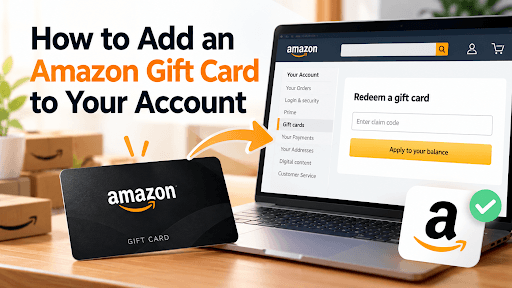
An Amazon Gift Card can be redeemed to your Amazon account balance and then used for eligible purchases on the corresponding Amazon marketplace. If you want to know how to add an Amazon Gift Card to account, there are two main options: redeem the card in advance so its value is stored in your balance, or enter the gift card code during checkout. After an Amazon Gift Card is redeemed, any unused amount remains in the account balance for future eligible purchases.
The exact steps for how to redeem an Amazon Gift Card vary slightly depending on whether you use the Amazon website, mobile app, or a digital gift card received by email or as a code. Before you add an Amazon Gift Card to Amazon account, check that you are signed in to the account where you want the funds stored. You should also verify the card's region because Amazon Gift Cards are generally tied to a specific Amazon marketplace, and a card intended for one country may not be redeemable on another country's Amazon site.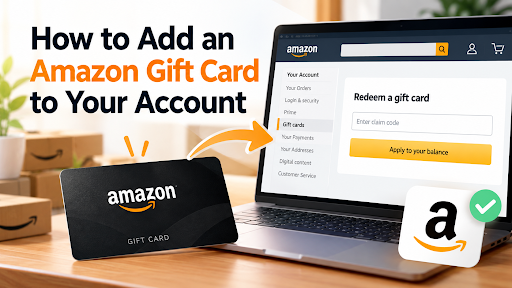
What You Need Before You Add an Amazon Gift Card to Your Account
Before redeeming a card, you need access to the Amazon account that should receive the funds and a valid gift card or claim code. If you want to add a gift card to Amazon after receiving one, start with the account and regional details rather than entering the code immediately. This takes only a few checks and can prevent the card from being redeemed to the wrong account or used on an incompatible marketplace.
Before redemption, check:
- Amazon account: sign in to the account where you want the gift card funds stored. This is particularly important if you have personal, business, or other Amazon accounts.
- Region: confirm the country or market for which the gift card was issued.
- Marketplace: open the Amazon website associated with that card rather than assuming one Amazon Gift Card works across all country sites.
- Claim code: copy the digital code exactly or carefully reveal it on a physical card.
- Redemption status: make sure the code has not already been used.
Amazon gift card region restrictions are particularly important when buying through Baxity Store because the catalog contains Amazon Gift Cards for different markets, currencies, and denominations. The value or currency alone does not determine whether a card is suitable for your account. Check the specified region on the product page before purchasing and again before entering the code on Amazon.
How to Add an Amazon Gift Card to Your Account on Desktop
If you want to add a gift card to Amazon through the desktop website, you can do so directly through the account's Gift Cards section. Have the claim code ready before you start and make sure you are using the correct Amazon marketplace.
Follow these steps:
- Sign in to the correct Amazon account. Check the account before redeeming because the resulting balance will be associated with that account.
- Open Account & Lists and go to Your Account. Find and open the Gift Cards section, where Amazon displays information related to your gift card balance and redemption.
- Select Redeem a Gift Card. This opens the field used to submit a claim code.
- Enter the claim code. On a physical Amazon Gift Card, reveal the code on the back according to the instructions printed on the card. Amazon physical gift card claim codes are typically 14 or 15 characters long. If you purchased a digital Amazon Gift Card through Baxity Store, the code is sent to your registered email and can also be accessed through your Baxity account under Orders.
- Check the code before submitting it. This is particularly useful when entering a physical code manually, since similar-looking characters can result in an error.
- Select Apply to Your Balance. Amazon will process the code and, if it is valid for the account and marketplace, add its value to the gift card balance.
- Check the displayed balance to confirm that the funds were added successfully.
If you want to add a gift card to Amazon without waiting until you make a purchase, this is the relevant method. The value is stored in the account and can then be used for eligible purchases, so the same successfully redeemed claim code does not need to be entered again for each order.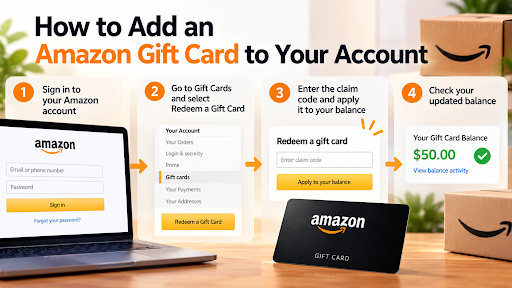
For example, if a $100 card is redeemed successfully, the account's available gift card balance increases by $100 before any purchases are made. If $60 is later used for an eligible order, the remaining $40 stays in the account for subsequent eligible purchases.
How to Add an Amazon Gift Card on the Amazon App
The mobile process leads to the same account balance, but the navigation differs from the desktop website. If you want to add an Amazon Gift Card through a phone, first open the Amazon app and verify which account and marketplace are currently active. This check matters because it is easy to remain signed in to an account previously used in the app.
Then follow these steps:
- Open the account or profile area in the Amazon app.
- Find the Gift Cards or Gift Card Balance section.
- Select the option to redeem another gift card.
- Enter the claim code manually. If a scanning option is available for your physical card, you can use it instead of typing the code.
- Review the entered code before submitting it.
- Select Apply to Your Balance.
- Check the updated balance to confirm successful redemption.
The main difference on mobile is the interface rather than what happens to the funds. Once Amazon accepts the code, the gift card value is associated with that Amazon account just as it would be after redemption on desktop.
Scanning can be useful with physical cards because it reduces manual entry. However, if the app cannot recognize the code or the scanning option is unavailable, enter the characters manually. For a digital gift card, copying the supplied code is generally more practical than trying to scan it from another screen.
How to Redeem an Amazon E-Gift Card
The process for how to redeem an Amazon e Gift Card depends on how the digital card was delivered. Not every digital gift card is presented to the recipient in exactly the same format.
An Amazon eGift Card sent directly through Amazon may arrive by email, text message, or a shareable link. If the delivery provides an Apply to Your Amazon Account option, sign in to the intended account and follow that redemption route. Check the account before confirming the action so that the value goes to the intended balance.
A digital card supplied as a separate claim code follows a different route. For example, a digital Amazon Gift Card purchased through Baxity Store provides a code that can be entered through Amazon's Redeem a Gift Card page. There is no physical covering to remove, so the code can be copied from the digital delivery and entered into the appropriate field.
The practical distinction is simple: first identify whether you received a direct Amazon redemption link or a separate claim code. Do not look for a physical-style code when the Amazon delivery itself provides a redemption link, and do not expect a third-party digital voucher code to work like an Amazon email button.
In either case, verify the Amazon account and marketplace before completing redemption.
How to Apply an Amazon Gift Card at Checkout
You can also redeem a gift card while placing an eligible order instead of adding it to the account balance beforehand. If you want to add a gift card to Amazon during a purchase, the relevant field appears in the checkout payment section.
The process is straightforward: add the products you want to purchase to the cart, proceed to checkout, review the delivery and order information, and open the payment section. Locate the field for a gift card, voucher, or promotional code, enter the claim code, and select Apply. Check that the gift card value has been reflected in the payment details before placing the order.
The two redemption methods differ mainly in timing:
| Method | When to Use | What Happens |
|---|---|---|
| Add to balance | Before shopping | The value is stored in the Amazon account |
| Apply at checkout | While placing an order | The gift card is applied during checkout |
Applying a card during checkout is convenient when you already have an eligible purchase ready. Adding the value to your balance first is more practical when you want the funds available for later orders or do not yet know what you will buy.
In both cases, review the order total after the card is applied. If the available gift card value does not cover the entire eligible order, an additional applicable payment method may be required for the remaining amount.
How to Check Your Amazon Gift Card Balance
After redemption, sign in to the same Amazon account and open the Gift Cards section. The displayed Amazon gift card balance should reflect the redeemed amount minus any gift card funds already used for eligible purchases.
For example, if you redeem a $50 card and have no previous balance, the account should show $50 after successful redemption. Spending $35 from that balance leaves $15 available. You do not need a new claim code to use the remaining $15 because the value is already stored in the account.
If an eligible order exceeds the available gift card balance, Amazon can apply the available amount and use an applicable payment method for the remainder. A $40 balance applied to an eligible $65 order, for example, leaves $25 to be covered by another applicable payment method.
Checking the balance immediately after redemption also provides a simple confirmation that the card was successfully applied to the intended account. If the expected amount does not appear, check the redemption status before attempting to enter the code again.
Can You Add Multiple Amazon Gift Cards to One Account?
Multiple eligible Amazon Gift Cards can be redeemed to the same account. Each claim code is entered separately, while the redeemed values contribute to the account's overall gift card balance rather than remaining as separate balances that must be selected individually.
For example, redeeming a $25 card and then a $50 card increases the available gift card balance by $75 if none of those funds has been spent. If the account already contained $10, the resulting balance would be $85.
This can be useful when you receive several cards with smaller denominations or purchase more than one digital code. The basic redemption procedure does not change: enter each valid code separately and check the updated balance after redemption.
When adding several cards, verify each one individually. The fact that one code is accepted does not guarantee that another card issued for a different Amazon marketplace will also work on the same site.
Amazon Gift Card Region Restrictions Before You Redeem
Amazon Gift Cards are generally issued for a particular Amazon marketplace. A card intended for one country should therefore not be assumed to work on another country's Amazon website, even when the user has Amazon accounts or access to Amazon services in multiple markets.
Before redemption, verify:
- The country or region specified for the gift card
- The Amazon marketplace where the card can be redeemed
- The Amazon account currently signed in
- The card's currency
- The selected denomination
This check should take place before purchasing the card, not only after a redemption error occurs. For example, finding a card with the denomination you need is not sufficient if that product is intended for a different regional Amazon marketplace.
Baxity Store offers Amazon Gift Cards for different markets and currencies, so select the regional product that corresponds to the Amazon marketplace where you intend to redeem it. Regional information should be checked on the specific product rather than inferred from the Amazon brand name alone.
If you use several regional Amazon sites, pay particular attention to which one is open when entering the claim code. Checking the marketplace before redemption takes only a few seconds and is considerably easier than resolving an issue after a card has been applied to an unintended account.
Comment from Baxity Store: We recommend checking the card's region before completing your purchase rather than waiting until redemption. Amazon Gift Cards available on Baxity Store may be intended for different country-specific Amazon marketplaces, so always review the regional information on the selected product and make sure it corresponds to the Amazon marketplace you plan to use.
Why Is My Amazon Gift Card Not Working?
A rejected claim code does not always mean that the gift card has no value. Start by checking the card details, account, marketplace, and code itself. These checks help distinguish a simple entry problem from an account, regional, or order-related issue.
Common problems include:
- Wrong region or marketplace. Compare the card's specified market with the Amazon website where you are attempting redemption. If they do not correspond, do not repeatedly submit the same code.
- Incorrect claim code. Check every character and remove accidental spaces. With a digital code, copying and pasting can reduce manual typing errors.
- Code already redeemed. The same claim code cannot simply be redeemed again. Check whether its value was previously added to one of your Amazon accounts.
- Wrong Amazon account. If you maintain multiple accounts, verify which one is currently signed in and check the balance of any account where you may previously have redeemed the card.
- Damaged physical claim code. If scratching or removing the protective covering makes part of the code unreadable, do not guess the missing characters. Keep the physical card and relevant purchase information for support.
- Digital code was copied incorrectly. Make sure you copied only the claim code rather than surrounding text from the email or order page.
- Code still rejected after these checks. Contact Amazon Customer Service for issues involving Amazon redemption or the account. If the problem concerns delivery of a code purchased from a third-party seller, contact that seller about the order.
When contacting support, keep relevant information such as the physical card, purchase confirmation, or digital order details available. This can help establish which card or transaction the request concerns.
Do not publish a complete unused claim code in screenshots, reviews, forums, or social media while troubleshooting. A valid unredeemed code represents the value stored on the gift card and should be treated as sensitive payment information.
Comment from Baxity Store: If you purchased your Amazon Gift Card through Baxity Store, first compare the code in your email with the code available in the Orders section of your account and confirm that you are using the correct regional Amazon marketplace. If the delivered code itself appears to be the issue, keep your order information available when contacting Baxity Store support so the purchase can be identified and checked.
How to Buy a Digital Amazon Gift Card Online on Baxity Store
Baxity Store offers digital Amazon Gift Cards for multiple markets, currencies, and available denominations. Users should choose the product according to the Amazon marketplace where it will be redeemed rather than selecting a card based only on its face value. Current products, denominations, and payment options can vary, so check the available information directly on the selected product page.
The purchase process is:
- Sign in to Baxity Store or create an account.
- Select an Amazon Gift Card for the required region.
- Check the product details before adding it to the cart.
- Choose one of the currently available denominations and set the required quantity.
- Add the product to the cart and proceed to checkout.
- Review the region, denomination, quantity, and final order amount.
- Choose one of the payment methods currently displayed for your order. Available options can depend on the region and checkout conditions, and cryptocurrency payment methods may be available for eligible orders.
- Complete the payment.
- Check the email registered to your Baxity account for the digital code. The purchased code can also be accessed through your Baxity account under Orders.
Receiving a digital code removes the need to wait for delivery of a physical card. Once the code is available, open the corresponding Amazon marketplace and use the redemption process described above.
Before paying, pay particular attention to the region. A higher or lower denomination can usually be solved by choosing another available product, while purchasing a card for the wrong marketplace can prevent you from using it where originally intended.
What Happens After You Redeem an Amazon Gift Card?
After successful redemption, Amazon stores the gift card value in the selected account balance and can apply the available funds to eligible purchases.
The redeemed card itself does not need to be entered again. If only part of the available balance is spent, the remaining value stays in the account for subsequent eligible orders. For example, after using $70 from a $100 balance, $30 remains available.
The account used during Amazon Gift Card redemption matters because a redeemed balance cannot simply be transferred to another Amazon account. This is why checking both the account and marketplace before entering the code is more important than correcting them afterward.
Amazon also restricts using gift card funds to purchase other gift cards. The redeemed balance should therefore be treated as funds for eligible purchases on the corresponding Amazon marketplace rather than as a transferable balance or a way to convert one gift card into another.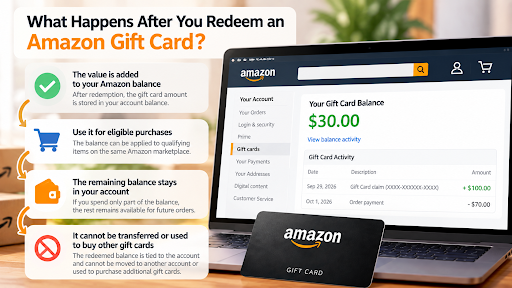
Conclusion
Adding an Amazon Gift Card to your account is a short process, but the details should be checked before redemption. Make sure you are signed in to the intended Amazon account, confirm that the gift card matches the correct regional marketplace, and verify the claim code before applying it. Once successfully redeemed, the value becomes part of your Amazon Gift Card balance and can be used for eligible purchases, while any unused amount remains available for future orders.
If you need a new Amazon Gift Card, Baxity Store offers digital Amazon Gift Cards for different regions, currencies, and available denominations. Customers can select the appropriate card, choose an available payment method, complete the purchase, and receive the digital code by email or access it through their Baxity account after payment confirmation. Baxity Store also offers other gift cards, prepaid cards, gaming credits, and digital vouchers, making it possible to purchase different digital products through one marketplace.
FAQ: How to Add an Amazon Gift Card to Your Account
Can I Give an Amazon Gift Card to Someone Else? Yes, an unredeemed Amazon Gift Card can be purchased as a gift for another person. The recipient should redeem the card using their own Amazon account rather than having the sender add it to an account first. Before buying the card, check which Amazon marketplace the recipient normally uses because gift cards are issued for specific regional markets. For a digital card, the recipient will need access to the claim code or the appropriate redemption delivery. Once the card has already been redeemed, its value becomes associated with that Amazon account and should no longer be treated as an unused gift code.
Can I Use an Amazon Gift Card for Amazon Subscriptions? Whether gift card funds can be used for a particular Amazon subscription or recurring service depends on the service and its payment requirements. A gift card balance should not automatically be assumed to work for every Amazon product simply because it is available in the account. Some transactions may require another valid payment method or have separate payment rules. Check the payment options shown for the specific subscription before relying on the gift card balance. This is especially important for recurring charges because the requirements may differ from those for a standard one-time purchase.
Can I Get Cash Back From an Amazon Gift Card? Amazon Gift Cards are intended to provide value for eligible purchases rather than function as a general cash withdrawal method. Redeeming a card does not turn the balance into money that can normally be withdrawn to a bank account or payment card. For this reason, users should consider where they intend to spend the card before redeeming it. The same consideration is useful when selecting a denomination, particularly for higher-value cards. Any applicable exceptions or legally required refund provisions depend on Amazon's terms and the relevant jurisdiction.
Can I Use an Amazon Gift Card Without a Credit Card? An Amazon Gift Card can provide funds for eligible purchases without requiring the full order value to be charged to a credit card. Whether another payment method is needed depends on the transaction and the amount available in the gift card balance. Certain products or services may also have their own payment requirements. For that reason, having sufficient gift card funds does not necessarily mean that every Amazon transaction can be completed without another payment method. Review the payment information displayed for the specific order before confirming the purchase.
Is an Amazon Gift Card the Same as an Amazon Promotional Credit? No, a gift card balance and promotional credit should not automatically be treated as the same type of account value. Amazon promotions can have their own eligibility requirements, expiration conditions, or restrictions on the products to which they apply. Gift card funds are associated with the rules governing Amazon Gift Cards rather than the terms of a particular promotion. If both types of credit appear on an account, check the order summary to understand how Amazon applies them to the purchase. Reading the conditions of a specific promotion is particularly important because they may differ from the conditions attached to gift card funds.
Should I Keep My Amazon Gift Card Code After Redemption? It is sensible to keep the original card or purchase information until you have confirmed that the redemption was successful. For a physical card, this can include retaining the card itself rather than discarding it immediately after entering the claim code. For a digital purchase, keeping the order confirmation can provide a record of the transaction. Once the value has been successfully associated with the intended account, the claim code should not be shared with other people. Purchase records can also be useful if you later need to identify the transaction when contacting the seller or Amazon about a problem.
Is It Safe to Share a Screenshot of an Amazon Gift Card? You should avoid sharing any image that clearly displays an unused Amazon Gift Card claim code. A claim code provides access to the card's value before it has been redeemed, so it should be handled carefully. If you need to send a screenshot to customer support, hide information that is not required unless the official support process specifically requests it. The same caution applies when posting photos of physical cards, emails, or digital order pages online. Treat an unused gift card code similarly to other payment information that should not be made publicly accessible.


Comments
Sign in to join the conversation. Every comment is reviewed before it appears on the page.
Sign in to comment
You need an account to leave a comment. Sign in and your name will be used automatically.
No comments yet. Be the first to write one.