Looking for a way to buy a gift card, top up your gaming account, or grab a crypto voucher without pulling out your bank card? BLIK lets you do exactly that. At Baxity Store, you can pay for gift cards, game credits, and crypto vouchers using BLIK, confirming your purchase in seconds directly from your banking app. This matters more than it might seem at first. BLIK has become the default checkout choice for a huge share of online shoppers, and for good reason: no card number to type, no extra app to install, and a code that expires in just two minutes for added security. If you have ever hesitated to enter your card details on a new site, BLIK removes that friction entirely. In this guide, we will walk through why BLIK works so well for digital purchases, what exactly you can buy with it at Baxity Store — from Steam BLIK payments to Xbox top-ups and crypto vouchers — how the checkout process works step by step, and what to do if something goes wrong along the way.

Why Pay with BLIK at Baxity Store?
Every payment method solves a specific problem. For BLIK, that problem is friction at checkout. A lot of shoppers abandon a purchase the moment they are asked to type in a sixteen-digit card number, an expiry date, and a CVV code, especially on a site they are using for the first time. That is why a fast, code-based alternative has become so popular. Here is what makes BLIK a practical choice for buying digital products online:
- No card details required — you confirm the payment inside your own banking app, not on the merchant's checkout page.
- No additional registration — if your bank supports BLIK, it is already built into your existing mobile banking app.
- Short-lived codes — each BLIK code is valid for only two minutes, which limits the window for misuse.
- Instant confirmation — funds are authorised almost immediately, so your order can be processed without delay.
- Familiar and trusted — millions of shoppers already use BLIK daily, not just at Baxity Store but across almost every Polish online store.
None of this means other payment methods are worse. It simply means BLIK solves a specific pain point extremely well: speed and privacy at the point of payment, particularly useful when you are buying something you would rather not tie to your card statement in detail, such as a crypto voucher or a gift card for a private gift.
What Can You Buy with BLIK at Baxity Store?
Baxity Store operates as a verified international reseller of digital vouchers, gift cards, and prepaid products, active in more than 100 countries for over a decade. If you have been searching for a specific store that accepts BLIK for a specific platform, this section is for you. Here is exactly what you can buy, brand by brand.
Steam Gift Cards with BLIK
Steam BLIK is one of the most searched combinations among Polish gamers, and it is easy to see why. Steam does not let you add a bank account or a BLIK code directly to your wallet, so the only official route is a Steam gift card. At Baxity Store, you can "kup kartę podarunkową Steam" and pay for it with BLIK at checkout, then redeem the code straight into your Steam Wallet in minutes. No card, no wallet linking, no waiting for a bank transfer to clear.

Steam Wallet Credits
Xbox BLIK Payment
Xbox does not support BLIK as a direct payment method on the Microsoft Store either, which leaves a lot of players searching for a workaround. The workaround is simple: buy an Xbox gift card through Baxity Store, pay with BLIK, and redeem the code on your Microsoft account. It works for game purchases, Xbox Game Pass, and DLC, without ever entering a card number on Microsoft's checkout page.
Xbox Game Pass
PlayStation BLIK
The same logic applies to PlayStation. Sony's own store checkout does not accept BLIK directly, so PlayStation Store gift cards purchased with BLIK through Baxity Store are the fastest way to top up your PSN wallet. Once redeemed, the balance sits on your account and can be used for games, subscriptions, or add-ons whenever you want.
PlayStation Gift Cards
Amazon Gift Card BLIK
Amazon gift card BLIK purchases are popular for a slightly different reason: privacy and budgeting. Buying a gift card with a fixed value through Baxity Store lets you shop on Amazon without linking your main card, which is useful if you want to cap your spending or send a gift without sharing payment details with anyone else.
Amazon Gift Cards
Google Play BLIK
For Android users, Google Play BLIK cards cover everything from apps and subscriptions to in-game purchases across thousands of titles. Since Google Play does not offer BLIK as a native checkout option in every region, a gift card bought with BLIK through Baxity Store is the most direct way to add balance to your Google account.
Google Play Gift Cards
Netflix Gift Card BLIK
Streaming subscriptions are usually billed to a recurring card, which is not always what people want, particularly for a shared account or a gift. A Netflix gift card BLIK purchase lets you prepay a subscription period without setting up recurring billing at all.

Netflix Gift Cards
Crypto Vouchers via BLIK
This is where BLIK becomes particularly useful. Buying cryptocurrency usually means registering on an exchange, passing identity verification, and linking a bank account or card, a process that can take days for a first-time buyer. A Binance BLIK voucher, or any other crypto voucher purchased through Baxity Store, skips most of that. You pay with BLIK, receive a redeemable code, and top up your chosen crypto wallet or exchange account on your own schedule, without exposing your card details to a third-party platform.
Binance Gift Cards
And Much More
Steam, Xbox, PlayStation, Amazon, Google Play, Netflix, and crypto vouchers are only the most searched examples, not the full picture. The Baxity Store catalog covers hundreds of additional gift cards, subscription codes, and prepaid products across gaming, entertainment, and shopping, and every single one of them can be paid for with BLIK. If you don't see the exact brand you're looking for in this guide, chances are it's already in the store.
How to Pay with BLIK at Baxity Store — Step by Step
The checkout flow is designed to take less time than reading this sentence out loud. Here is exactly how it works, whether you are buying a Steam card, an Xbox top-up, or a crypto voucher.
- Create your free Baxity account. A verified account is required before you can complete any purchase, and it also lets you track every order from your personal dashboard afterward.
- Browse the Baxity Store catalog and add your chosen gift card, game credit top-up, or crypto voucher to the cart.
- Proceed to checkout and select ZEN, than BLIK as your payment method.
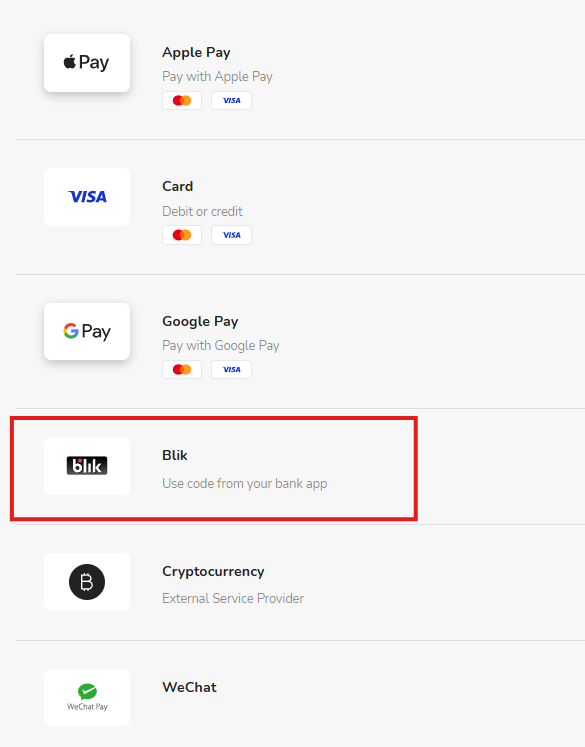
- On the payment methods screen, choose Blik — Use code from your bank app. Review your order on the secure payment page. You'll be redirected to a page showing your order total converted to PLN (Baxity's payments are processed via ZEN.com), along with the applicable exchange rate. Click "Pay [amount] PLN" to continue to the BLIK code screen.
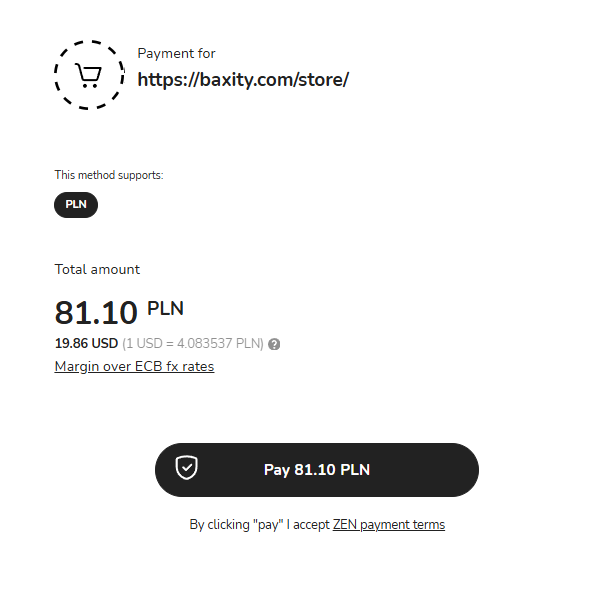
- Generate your BLIK code in your banking app. If you're not sure where to find it, the checkout page includes a "Where to find the code?" link listing supported banks (PKO BP, mBank, ING, Santander, Millennium, Citi Handlowy, and others). Enter the 6-digit code in the BLIK code field and click Continue.
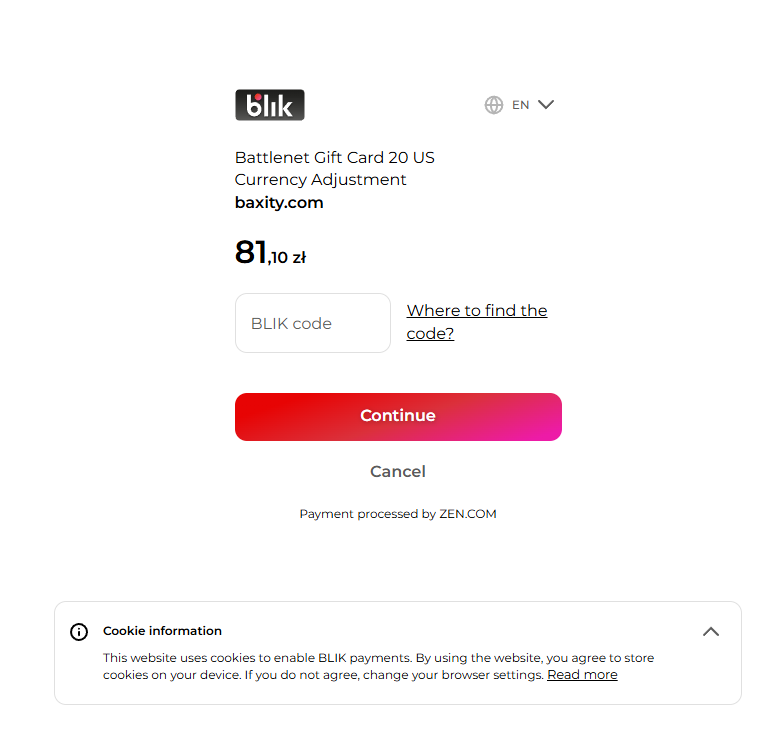
- Enter the code and confirm the transaction inside your banking app, either with a PIN or biometric authentication.
- Receive your code by instant digital delivery, ready to redeem right away.
There is just one problem some first-time buyers run into: entering the code too slowly. Because the BLIK code is only valid for two minutes, it helps to have your banking app open and ready before you reach the payment step at checkout.
Pricing, Fees, and What You Actually Pay
Pricing transparency is worth spelling out clearly, because it is one of the most common questions we get. The price shown on a Baxity product page is the price of that specific package. If a payment processing fee applies to your chosen method, it is displayed clearly at checkout before you confirm anything, so there are no surprises once the transaction has already gone through. Here is a quick comparison of how BLIK stacks up against other common checkout options for digital purchases:
| Feature | Standard Card Checkout | BLIK Payment at Baxity Store |
|---|---|---|
| Card Data Exposure | Card number, expiry date, and CVV are entered directly on the merchant's page. | None. Payment is confirmed inside your own banking app only. |
| Confirmation Speed | Seconds to minutes, depending on issuing bank and 3D Secure checks. | A few seconds. One code, one tap in your app. |
| Code Validity Window | Not applicable — card details remain valid until expiry or cancellation. | 2 minutes per code, reducing the window for misuse. |
| Setup Required | Card issuance, activation, and sometimes 3D Secure registration. | None. Built into your existing mobile banking app. |
| Best For | Shoppers who prefer traditional, recurring card billing. | Fast, one-off purchases like gift cards, top-ups, and crypto vouchers. |
| Regional Support | Works globally wherever card networks are accepted. | Native to Poland, supported by all major Polish banks (PKO BP, mBank, ING, Santander, and others). |
Worth noting: cryptocurrency is also accepted as a payment method at Baxity Store, so if you already hold crypto, you are not limited to BLIK or a traditional card. This flexibility is part of why the platform works well for buyers across such a wide range of countries and banking systems.
Is BLIK Safe for Buying Gift Cards and Crypto Vouchers?
Security concerns come up often, particularly with crypto-related purchases, and they deserve a straight answer. BLIK codes are single-use, tied to a specific transaction, and expire after two minutes, which limits how a stolen code could realistically be exploited. The confirmation step inside your banking app also shows the exact transaction amount and recipient before you approve anything, giving you a final chance to catch anything unexpected. That said, the biggest real-world risk with BLIK has nothing to do with the technology itself. Scammers occasionally try to trick people into sharing a BLIK code directly, usually by posing as a friend or relative in urgent need of money. A legitimate checkout, including the one at Baxity Store, will never ask you to share your code with another person. You generate it, you enter it, and you confirm it yourself, entirely within your own banking app.
What to Do If BLIK Is Not Working
Occasionally, BLIK payments fail or become temporarily unavailable, and it is rarely anything to do with the merchant. Common causes include a weak mobile signal when generating the code, a transaction limit set too low in your banking app, scheduled maintenance at your bank, or, less often, a wider system-wide outage affecting the BLIK network itself. If you run into an issue mid-checkout, try these steps before giving up on the purchase:
- Check your mobile signal and reopen the banking app to generate a fresh code.
- Confirm your BLIK transaction limit is high enough to cover the purchase.
- Wait a minute and try again, since codes expire quickly and a delay can cause a failed attempt.
- Switch to an alternative payment method at checkout, such as a card, digital wallet, or cryptocurrency, all of which are supported at Baxity Store.
Frequently Asked Questions
Does Baxity Store accept BLIK?
Yes. BLIK is available as a checkout option for gift cards, game credits, and crypto vouchers on Baxity Store.
Can I use BLIK to pay for a Steam gift card?
Yes. Steam does not accept BLIK directly, but you can buy a Steam gift card at Baxity Store, pay with BLIK, and redeem the code into your Steam Wallet.
Does Xbox or PlayStation accept BLIK payments directly?
No, neither platform supports BLIK on their own checkout. Buying an Xbox or PlayStation gift card through Baxity Store and paying with BLIK is the official workaround.
Is BLIK safe for buying gift cards and crypto vouchers?
Yes, each code is single-use, tied to your specific transaction, and expires within two minutes, which limits the risk of misuse.
Do I need a Baxity account to pay with BLIK?
Yes, a verified Baxity account is required to complete any purchase, and it also lets you track your order history from your dashboard.
How long does delivery take after paying with BLIK?
Delivery is instant. Once your BLIK payment is confirmed, your code is issued digitally and ready to redeem right away.
Are there hidden fees when paying with BLIK?
No. The price shown on the product page is the price of the package, and any processing fee is displayed clearly at checkout before you confirm.
Ready to Check Out with BLIK?
Whether you are topping up Xbox, PlayStation, or Steam, sending an Amazon or Netflix gift card, or picking up a crypto voucher, BLIK gets you through checkout in seconds without ever touching a card number. Browse the full catalog at Baxity Store, create your free account, and select BLIK the next time you are ready to pay.


Comments
Sign in to join the conversation. Every comment is reviewed before it appears on the page.
Sign in to comment
You need an account to leave a comment. Sign in and your name will be used automatically.
No comments yet. Be the first to write one.