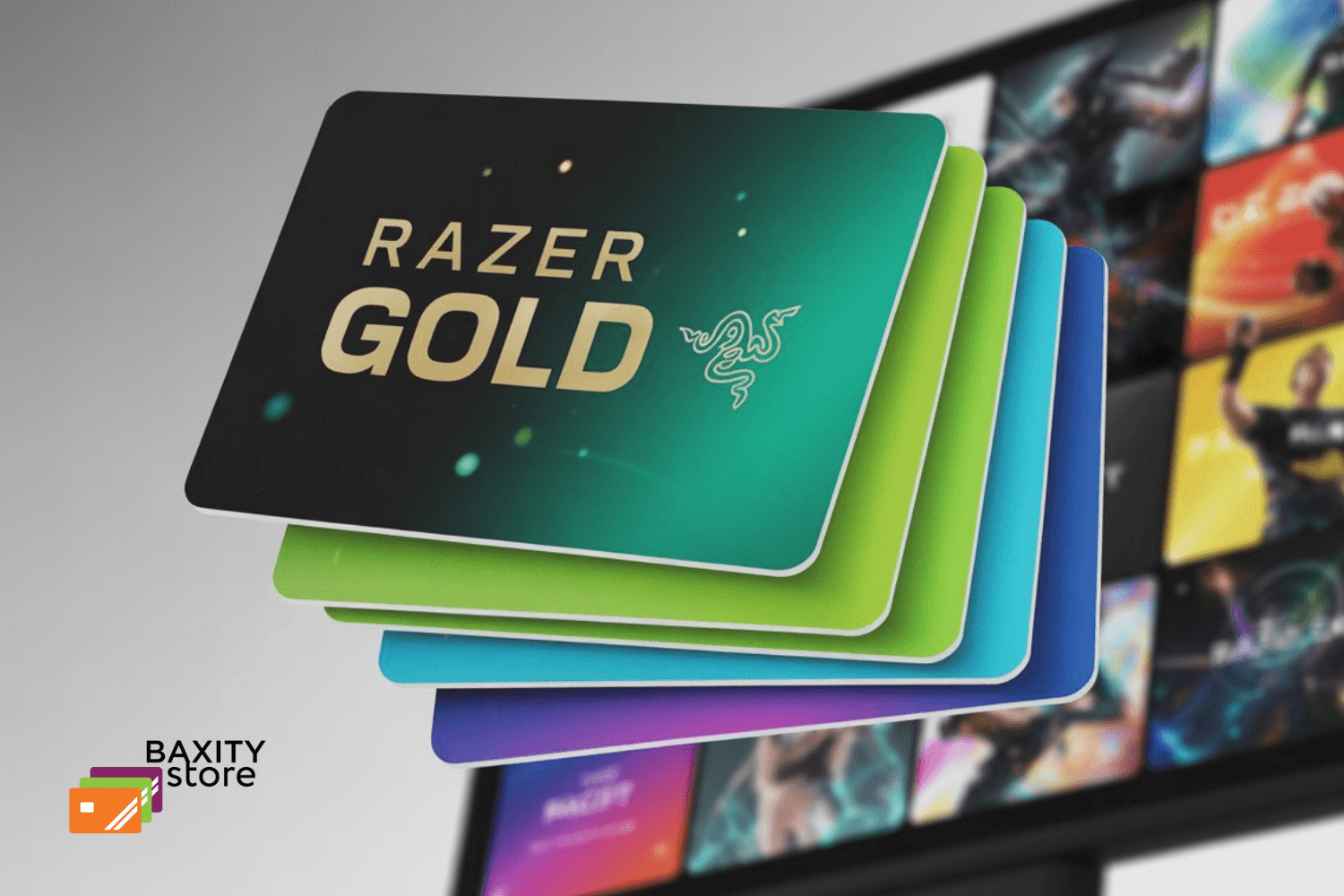
Introduction
You’ve just found the perfect in-game item, and you’re ready to grab it using your Razer Gold credits. But then it happens: a cryptic error message, a failed transaction, or worse—your account gets suspended without warning. If this sounds familiar, you are not alone. Razer Gold is a powerful platform for gamers, offering access to a world of content across thousands of games. However, navigating its system can sometimes feel like a boss battle in itself. Users frequently encounter a host of frustrating issues, from regional restriction errors and confusing redemption processes to poor exchange rates and unresponsive customer support. These problems can turn a simple top-up into a lengthy ordeal, leaving your funds locked and your gaming session on hold.
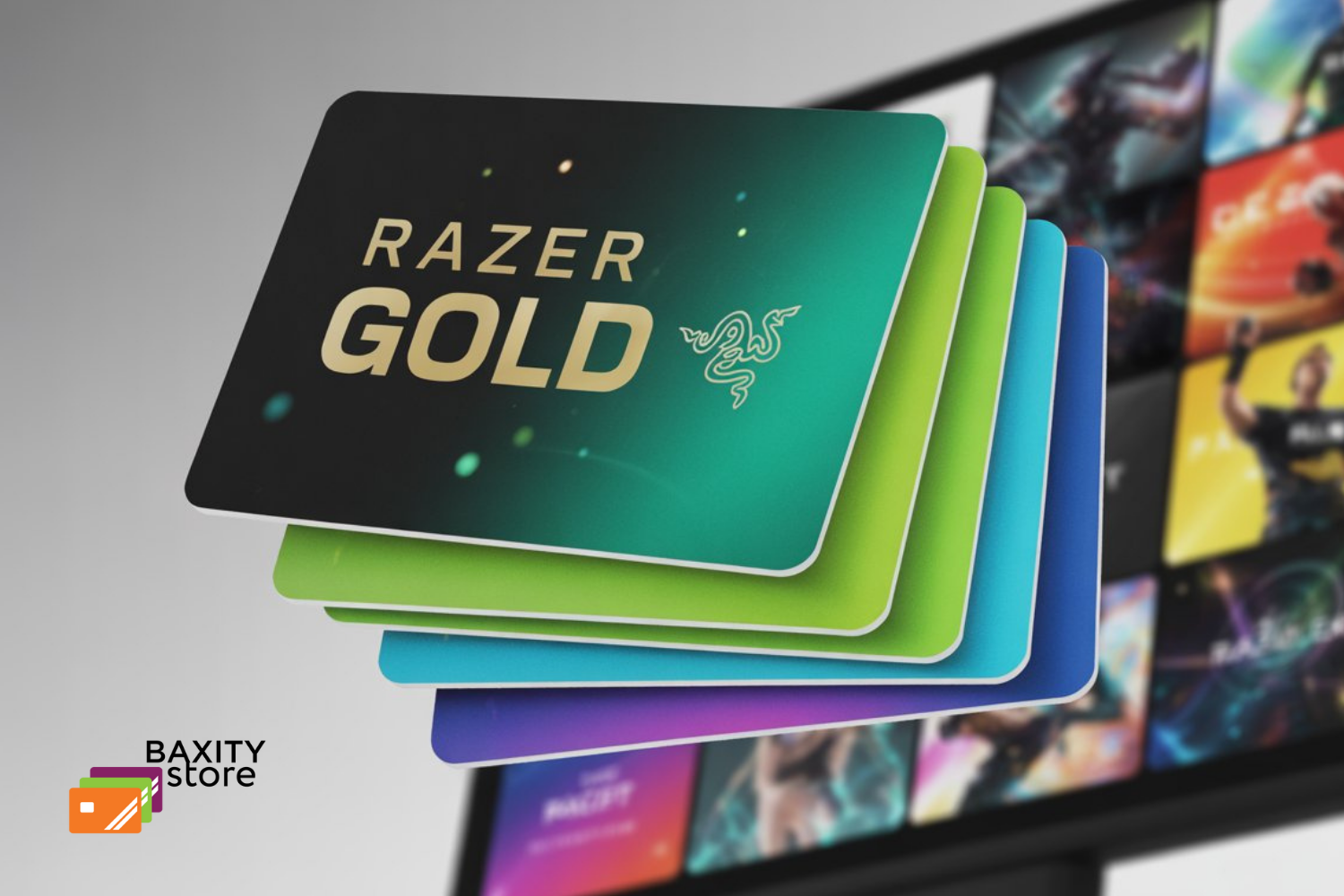
This comprehensive guide is your ultimate strategy guide. We’re cutting through the frustration to detail the most common Razer Gold problems customers face and, most importantly, providing you with the clear, step-by-step solutions you need to fix them. Whether you're dealing with a stubborn PIN code, a delayed top-up, or a security concern, we’ll help you get back to what matters most—your game.
Start on the Right Foot: The Baxity Store Solution
Before we delve into the common problems and their solutions, it's worth introducing a reliable way to enhance your Razer Gold experience from the start: the Baxity Store. As an official retailer, Baxity offers a secure and instant method to purchase Razer Gold Gift Cards, effectively bypassing many of the top-up and regional issues users frequently face. By choosing a trusted reseller like Baxity, you can pre-emptively avoid common frustrations, ensuring your focus remains on gaming, not on troubleshooting. Now, let's explore the challenges and how to overcome them.
Your Shortcut to a Smoother Razer Gold Experience: Buy from Baxity Store
Tired of navigating the common pitfalls of Razer Gold? There's a simpler and more reliable way to top up your gaming wallet. By purchasing your Razer Gold Gift Card from the official Baxity Store, you can bypass many of the technical headaches and secure better value, getting you back into the game faster and safer.
Why Buy Your Razer Gold Gift Card from Baxity Store?
When you choose Baxity, you're not just buying credits—you're choosing a superior and secure purchasing experience.
- Instant Delivery & No Delays: Forget waiting hours for top-ups to process. Receive your unique Razor Gold PIN instantly via email after purchase. Redeem it immediately on the official Razer Gold website, and your credits are ready to use.
- Guaranteed Regional Compatibility: Baxity provides Razer Gold PINs specifically for your region, drastically reducing the risk of "invalid PIN" or regional restriction errors. You buy with confidence, knowing the code will work.
- Secure and Trusted Source: As an official retailer, Baxity guarantees 100% legitimate and unused PINs, protecting you from the fraud and account bans associated with gray-market sellers.
- Simple Payment Process: Enjoy a streamlined checkout with various local payment options, avoiding the complex and sometimes unreliable payment gateways on other platforms.
- Competitive Offers: Baxity frequently offers competitive pricing and special promotions, ensuring you get the most value for your money when you buy Razer Gold credits.
📚 Related Articles
- Where to buy and how to redeem Razer Gold Credits for gamers?
- All You Need to Know About Razer Gold Gift Card
- Razer Gold Cheap Top Up – Best Deals for Gamers
- Razer Gold Gift Card Discount – How to Maximize a Budget
How to Buy and Redeem Your Razer Gold PIN from Baxity in 3 Easy Steps
Ready to upgrade your top-up method? Here’s how simple it is:
- Visit Baxity Store: Go to the official Baxity Store website and navigate to the Razer Gold Gift Card product page.
- Select Your Denomination & Purchase: Choose the amount of Razer Gold you need and complete the secure checkout process. You will receive your 16-digit PIN code instantly via email.
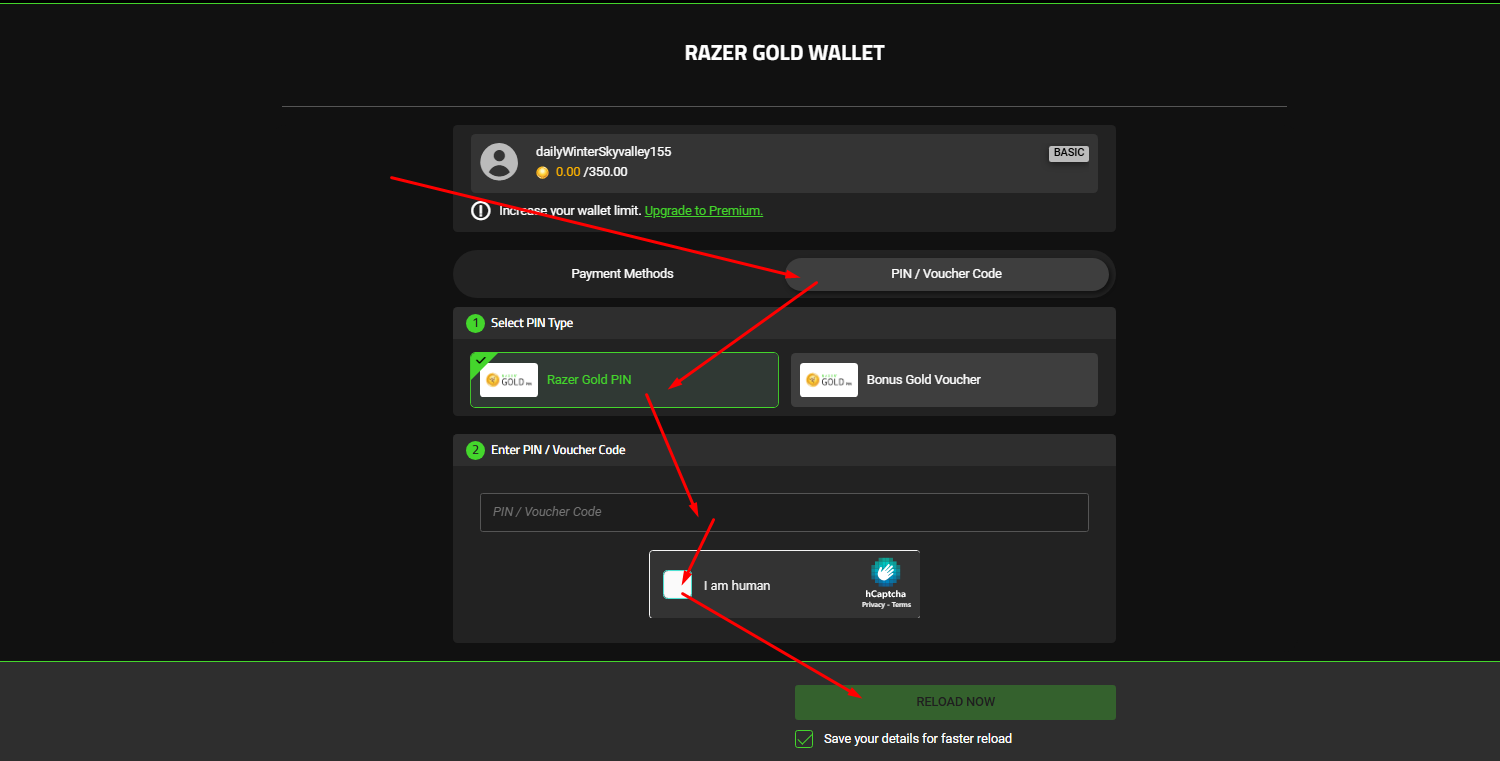
- Redeem on Razer Gold: Go to the official Razer Gold PIN redemption page, log in, choose PIN/Voucher Code, select PIN type - Razer Gold PIN, enter your PIN, click "I'm human", and hit "Reload Now." Your wallet will be topped up instantly, and you're ready to play.
Stop letting technical glitches interrupt your game. Choose a smarter, faster, and more secure way to power up your gaming.
Buy Your Razer Gold Gift Card from Baxity Store Now & Game Instantly!
Razer Gold Gift Card
How to Resolve Razer Gold Technical & Usability Problems
1. Solving Regional Restrictions and Game Compatibility Issues
This is often the most complex problem, but it can be avoided with careful steps. Before You Buy:
- Verify, Then Purchase: Never assume a game is supported in your region. Always double-check.
- Go to the official Razer Gold Game Directory (search "Razer Gold supported games").
- Find your game and click on it. The page will explicitly list the supported regions.
- Critical Step: Also check the game's own website or client. Sometimes, the game publisher may have regional restrictions that even Razer Gold cannot bypass.
- Buy from a Local Source: Always purchase your Razer Gold PIN from a retailer (online or physical) that is based in your country/region. If you are in Malaysia, buy from a Malaysian website. If you are in Turkey, buy from Baxity Store in TR currency. This guarantees the PIN is meant for your region.
- Use a VPN with Caution (Not Recommended): While using a VPN to redeem a PIN from another region is technically possible, it is a direct violation of Razer's Terms of Service and can lead to permanent account suspension. The risk far outweighs the reward.
If You Already Have a PIN from the Wrong Region:
- Contact the Seller.
- Sell or Gift It.
2. Fixing the Complex and Unreliable Redemption Process
Understanding the correct workflow is key to avoiding redemption errors.
- Follow the Official Two-Step Process Correctly:
The most common mistake is trying to use the PIN directly in the game. The correct process is always: 1. Redeem the PIN to Your Razer Gold Wallet:
- Go to the official Razer Gold Redeem Page.
- Log in to your account.
- Carefully enter the 16-digit PIN (no dashes). Double-check for typos.
- Click "Reload Now." The value of the PIN will now be in your Razer Gold wallet balance.
2. Spend the Balance in the Game: Now, go to the game or platform where you want to make a purchase.
- Go to the payment or top-up section.
- Select Razer Gold as your payment method.
- You will be redirected to a Razer login. Log in and authorize the payment from your wallet balance (not with a PIN).
Troubleshooting Redemption Errors:
- "Invalid PIN" Error: This usually means the code has a typo, has already been redeemed, or is for the wrong region. Triple-check the digits.
- Transaction Fails After Wallet Top-up: This is often a temporary issue with the game's server or Razer's payment gateway. Wait 15-30 minutes and try the transaction again.
Check your Razer Gold transaction history. If the debit for the purchase is listed as "Pending," wait for it to clear or fail. If the problem persists, contact support with screenshots of the error and your transaction history.
3. Improving the Poor User Interface (UI) and Experience
You can't change the official UI, but you can optimize how you interact with it.
- Use the Search Function Aggressively: Don't browse for games. Use the search bar on the Razer Gold website or app to find your game directly. This is the fastest way to navigate.
- Bookmark Key Pages: Bookmark the direct links to your most frequently used pages: - Razer Gold Redeem Page - Transaction History - Supported Games Directory
- Use the Mobile App: Sometimes, the mobile app performs better or has a slightly different layout that you may find easier to use than the website.
- Clear Your Browser Cache: A slow, clunky experience can be caused by a overloaded browser cache. Regularly clear your cache and cookies for the Razer Gold site.
4. Dealing with Delayed Credit Top-ups
Delays are frustrating but are usually resolved with patience and the right actions.
- Patience is the First Step: Razer's system can sometimes take 5-15 minutes to process a top-up, especially during peak hours. Before panicking, wait at least 15-30 minutes.
- Always Get a Receipt: When you purchase Razer Gold directly or from a retailer like Baxity Store, you will receive an email receipt and a transaction ID. Do not delete this email. It is your proof of purchase.
- Check Your Transaction History: Log in to your Razer Gold account and go to your wallet or transaction history. Look for the transaction. If it's listed as "Pending," the system is still processing it.
Initiate a Support Ticket (If Needed): If the credits have not appeared after 2 hours, it's time to contact Razer Support. When you contact them, provide them with:
- Your Razer Gold account email.
- The Transaction ID from your receipt.
- The date, time, and amount of the purchase.
- A screenshot of your receipt (with sensitive personal info redacted).
Pro Tip for Instant Access: To completely avoid top-up delays, purchase a Razer Gold Gift Card PIN from a reputable retailer like Baxity Store. Once you redeem the PIN on the official website, the credits are immediately available in your wallet, eliminating the "pending payment" processing time from direct purchases.
How to Resolve Razer Gold Value & Financial Concerns
1. Mitigating "Bad Exchange Rates" and Perceived Hidden Fees
The key here is to recognize that the "fee" is often baked into the exchange rate. Your goal is to discover the true cost before you buy. Become a Smart Shopper: Calculate the "Cost Per Unit"
- Identify the Final In-Game Value: Don't look at the Razer Gold amount. Find out how much in-game currency (e.g., V-Bucks, COD Points, Crystals) a specific Razer Gold package will get you. For example, a "1000 Razer Gold" package might give you 750 V-Bucks.
- Find the Total Cost: Check how much that 1000 Razer Gold package costs in your local currency (e.g., $15 USD).
- Calculate and Compare: Cost per V-Buck: $15 / 750 V-Bucks = $0.02 per V-Buck. Now, go to the game's official store and check the direct purchase price for 750 V-Bucks. If it's $14.99, the value is similar. If it's $13.99, Razer Gold is offering poor value.
Always Compare Direct Payment Methods: Before checking out with Razer Gold, always proceed to the payment screen in the game using a credit card or PayPal. Note the final price. Then, compare it to the cost of the Razer Gold credits needed for the same purchase. Look for Promotions and Bonus Credits: Razer Gold frequently runs "Get 10% Bonus Gold!" or "Top-up and get extra Silver" campaigns. Only buy during these promotions. This effectively improves the exchange rate. Authorized retailers like the Baxity Store often have their own promotions or sell Razer Gold PINs at a slight discount, which can provide better value than buying directly.
2. Demystifying the "Gold to Silver Conversion Trap"
The confusion stems from seeing two numbers. The solution is to ignore Razer Silver for valuation purposes. Understand the System's Purpose: Razer Gold is what you BUY. It's the base currency. Razer Silver is a LOYALTY REWARD you earn for spending Gold. It's a separate currency for a separate rewards catalog. Focus on the Final Outcome, Not the Conversion: When you make a purchase, the system shows: "You spent 100 Gold and earned 100 Silver." This makes users feel like they are "losing" their Gold. The Correct Mindset: Instead of thinking "I lost 100 Gold," think: "I purchased 750 V-Bucks and as a bonus, I earned 100 Silver points that I can use for free rewards later." How to Verify Value:
- Before any purchase, the Razer Gold checkout page will clearly state: "You will receive: [In-Game Item]".
- That is the only number that matters. If it's the correct amount of in-game currency you wanted, then the transaction is valid. Ignore the Gold-to-Silver mechanics; treat Silver as a free loyalty program.
- Avoiding the "Stuck Balance" Problem of Non-Refundable Credit This is the most critical issue to prevent, as it is almost impossible to reverse once it happens. The solution is entirely about prevention and careful planning. Adopt a "Top-Up as You Go" Strategy: - NEVER bulk-top-up your Razer Gold wallet with a large sum of money "for future use." - ALWAYS top up the exact amount needed for a specific purchase you are about to make right now.
The Safe Top-Up Process:
- Add items to your cart in the game or platform first.
- Proceed to checkout and select Razer Gold as the payment method.
- Note the exact Razer Gold amount required (e.g., 845 Gold).
- Cancel the checkout. Now, go and purchase or top-up your Razer Gold wallet with as close to 845 Gold as possible. Many systems allow custom top-up amounts for this reason.
- Return to the game and complete the purchase with your newly added, precise balance.
Use Gift Cards for Better Control: Purchasing a Razer Gold Gift Card from the Baxity Store for a specific, planned amount is safer than directly adding flexible funds to your wallet. It acts as a pre-commitment and prevents impulsive bulk top-ups. What to Do If You Already Have a Stuck Balance:
- Use it Anyway: Look for other games in the partner directory that you might enjoy. The catalog is vast, including services like Spotify or Netflix in some regions. Find something to use the balance on.
- Gift a Purchase: If you have a friend who games, you can use your balance to purchase a game or in-game currency for them as a gift (you would need to log in and make the purchase yourself).
- Consider it a Loss and Learn: Unfortunately, Razer Support will not provide a refund. Use it as an expensive lesson to always use the "Top-Up as You Go" strategy in the future.
How to Resolve Razer Gold Security & Customer Support Issues
1. Preventing Account Bans or Suspensions
The best way to deal with a suspension is to avoid it altogether. Razer's automated systems are sensitive, so you must play by the rules. Adhere to Strict Account Practices:
- No VPN Usage: Never, ever use a VPN while making a purchase, redeeming a PIN, or logging into your Razer Gold account. This is the fastest way to get flagged for "suspicious location" and suspended.
- Avoid Rapid, Large Top-ups: Do not make several large top-up transactions in quick succession. This can appear as fraudulent "card testing" behavior. Space out your purchases if you need to buy a large amount.
- Use Consistent Payment Methods: Try to use the same payment method (e.g., the same credit card or PayPal account) linked to your name and address. Avoid frequently switching between different cards or accounts from different countries.
- Only Use Official Retailers: Purchasing PINs from unauthorized gray-market sellers greatly increases the risk of buying a stolen or fraudulent code, which will lead to an immediate and permanent ban. Always buy from authorized retailers like the Baxity Store or directly from Razer.
- Know the Terms of Service (ToS): Skim through the Razer Gold ToS. Understanding the rules (e.g., one account per person, no reselling credits) prevents accidental violations.
2. Navigating Extremely Poor Customer Support
When you need help, the standard "submit a ticket and wait" method often fails. You need a superior strategy. The "First-Ticket-Is-Your-Last" Strategy: Assume you will only get one chance to explain your problem. Your initial ticket must be so comprehensive that it cannot be ignored or answered with a copy-paste response. How to Create a Bulletproof Support Ticket: 1. Clear and Concise Subject Line:
- Bad: "Help me!!!"
- Good: "Account Suspension Appeal - Ticket #[Your Ticket Number]"
- Better: "Failed 1500 Gold Transaction for Mobile Legends - Transaction ID: XXXX-XXXX-XXXX"
2. Provide EVERY Piece of Data in the First Message:
- Razer ID/Email:
- Full Name on Account:
- Issue Date & Time (with Timezone):
- Transaction ID(s): For every relevant transaction (purchase, redemption, failed attempt).
- Game/Platform Affected:
- Error Message Screenshot: A clear, unedited screenshot of the exact error.
- Proof of Purchase: Attach the receipt from Razer or your retailer (e.g., Baxity Store invoice) with the transaction ID and amount clearly visible.
3. Write a Professional, Fact-Based Description:
- Briefly state the problem. "On [Date], I attempted to purchase [Item] in [Game]. The transaction failed with the error message '[paste exact error]'. My account was debited [Amount] Gold, but I did not receive the item."
- List the steps you have already taken to troubleshoot. "I have already: 1. Waited 24 hours. 2. Cleared my browser cache. 3. Attempted the purchase again. The issue persists."
- Politely state your desired resolution. "I would like the 1500 Gold returned to my wallet, or for the purchase to be completed successfully."
Escalation Pathways When a Ticket Stalls:
- Social Media Escalation: This is often the most effective method. Publicly (but politely) post your issue and your unanswered ticket number on their official social media channels.
- Twitter/X: Tweet at @RazerSupport and @Razer. Companies hate public displays of poor service.
- Reddit: Post in the r/Razer subreddit. Razer support staff actively monitor the sub.
- Template: "Hi @RazorSupport, my ticket #[Number] regarding an account suspension has been open for [X days] without a resolution. I've provided all requested info. Can you please have someone review it? Thank you."
- Retailer Leverage: If your issue is with a PIN purchased from an authorized retailer like Baxity Store, contact their support. They often have direct partner channels to Razer and can escalate the issue on your behalf, which can be much faster.
3. Fortifying Account Security
Preventing unauthorized access is entirely within your control. Enable Two-Factor Authentication (2FA) Immediately: This is the single most important security step you can take. If your password is ever compromised, 2FA will stop a hacker from logging in. Go to your Razer account security settings and enable 2FA using an authenticator app like Google Authenticator or Authy. Do not rely on SMS-based 2FA if you can avoid it, as it is vulnerable to SIM-swapping attacks. Use a Unique, Strong Password: Do not reuse a password from another site. Use a long, random password generated by a password manager (like Bitwarden or 1Password). Be Wary of Linked Accounts: Think carefully before linking your Razer Gold account to other gaming platforms. While convenient, each link is a potential security vector. Only link to accounts that you also secure with 2FA and strong passwords. Monitor Your Account Activity: Regularly check your Razer Gold transaction history for any purchases you didn't make. The sooner you spot fraudulent activity, the faster you can act. In summary, the formula for handling Razer Gold's toughest issues is: Prevention through strict compliance, Documentation for flawless support tickets, and Escalation via public channels when standard methods fail. By taking these proactive measures, you significantly reduce your risk and increase your chances of a positive outcome.
Razer Gold FAQ
Whether you're looking to buy in-game content, top up your wallet, or solve a tricky redemption issue, you've come to the right place. This FAQ covers everything from basic "how-to" questions to advanced troubleshooting, ensuring you get the most out of your gaming experience. For a secure and instant way to replenish your account, consider buying a Razer Gold Gift Card from Baxity Store.
Getting Started with Razer Gold
1. Q: What is Razer Gold and what is it used for? A: Razer Gold is a universal gaming credits system that allows you to purchase games, in-game items, and subscriptions from thousands of partnered game publishers and platforms. 2. Q: How do I create a Razer Gold account? A: You can create a free Razer Gold account on the official Razer Gold website or through the Razer Gold app by providing your email address and creating a password. 3. Q: Is Razer Gold free to use? A: Yes, creating and maintaining a Razer Gold account is completely free. You only pay when you purchase credits (Razer Gold) for your wallet. 4. Q: What is the difference between Razer Gold and Razer Silver? A: Razer Gold is the primary credit you purchase. Razer Silver is a reward currency earned when you spend Razer Gold, which can be redeemed for exclusive rewards. This conversion happens automatically during purchases. 5. Q: Where can I buy Razer Gold credits securely? A: You can buy Razer Gold directly from the official website or from authorized retailers. For a fast and reliable option, you can purchase a Razer Gold Gift Card from the official Baxity Store.
Purchasing and Redeeming Razer Gold
6. Q: How do I redeem my Razer Gold PIN? A: Go to the Razer Gold website, log in, navigate to "Razer Gold Wallet," enter your unique code, and click "Reload Now." The credits will be added to your wallet. 7. Q: I bought a Razer Gold Gift Card from Baxity Store. How do I use it? A: The PIN code you receive from Baxity Store is your Razer Gold PIN. Simply follow the standard redemption process on the Razer Gold website to add the credits to your account. 8. Q: Why is my Razer Gold PIN not working or invalid? A: Common reasons include typing errors, regional restrictions, or the PIN already being redeemed. Ensure you are in the correct region and have carefully entered the 16-digit code. 9. Q: What does "This PIN is not available in your region" mean? A: Razer Gold PINs are region-locked. You must redeem a PIN in the same region where it was purchased. A PIN bought for the US cannot be redeemed in Europe. 10. Q: How do I check my Razer Gold balance? A: Log in to your Razer Gold account on the website or mobile app. Your balance will be displayed on this page. 11. Q: Can I use Razer Gold for any game? A: Razer Gold can be used for thousands of games, but not all. Check the "Games" section on the Razer Gold website to see if your specific game is a partner. 12. Q: How do I top up my Razer Gold wallet? A: You can top up directly with a payment method on the website or, for instant delivery, buy a Razer Gold top-up PIN from Baxity Store. Go to account summary, click "Reload." 13. Q: Are there any hidden fees when using Razer Gold? A: Razer Gold does not charge transaction fees. However, the exchange rate from your local currency to Razer Gold credits may vary. 14. Q: What is the Razer Gold to Razer Silver conversion rate? A: Typically, for every 1 Razer Gold spent, you earn 1 Razer Silver. Check the official terms for the most current reward rates.
Troubleshooting Common Razer Gold Problems
15. Q: My Razer Gold transaction failed but I was charged. What should I do? A: First, wait 24 hours as transactions can be delayed. If the credits don't appear, contact Razer Support with your transaction ID and receipt. For purchases from Baxity, you can also contact their support for assistance. 16. Q: Why is my Razer Gold redemption taking so long? A: Redemption is usually instant but can be delayed due to high server load or regional verification. If it takes more than a few hours, contact support. 17. Q: My Razer Gold account was suspended. How do I recover it? A: Account suspensions are typically due to Terms of Service violations. You must contact Razer Support directly to resolve this issue. 18. Q: I forgot my Razer Gold password. How can I reset it? A: On the login page, click "Forgot Password?" and follow the instructions sent to your registered email address. 19. Q: Can I merge two Razer Gold accounts? A: No, Razer Gold accounts cannot be merged. Credits and rewards are tied to a single account. 20. Q: The game says my Razer Gold PIN is invalid, but it worked on the website. A: This is a common confusion. You must redeem the PIN on the Razer Gold website first to fund your wallet. Then, use your Razer Gold balance to make the purchase within the game. 21. Q: How can I fix Razer Gold login issues? A: Clear your browser cache and cookies, ensure your credentials are correct, or try using a different browser or the mobile app. 22. Q: Why can't I see my completed transaction history? A: Log in to your account on the Razer Gold website and navigate to the "Transactions" section. If it's missing, there may be a sync delay.
Razer Gold Gift Cards, Pricing, and Deals
23. Q: Where can I find the best Razer Gold Gift Card deals and discounts? A: Authorized retailers often run promotions. For competitive pricing and special offers, check out the Razer Gold Gift Card sold on Baxity Store. 24. Q: What is the price of a Razer Gold Gift Card? A: Gift cards are available in various denominations. You can find different value options, including fixed-amount cards, at retailers like Baxity Store. 25. Q: Can I get a refund for my unused Razer Gold credits? A: No, all sales of Razer Gold credits and gift cards are final and non-refundable, as stated in the Terms of Service. 26. Q: Can I transfer my Razer Gold balance to another user? A: No, Razer Gold credits are non-transferable and locked to the account they were redeemed on. 27. Q: How do I use Razer Gold to buy games on Steam, PUBG, or Mobile Legends? A: The process varies by game. Generally, you select Razer Gold as your payment method at checkout on the game's platform and log in to your Razer Gold account to confirm. 28. Q: Is there a Razer Gold bonus for first-time users? A: Razer often runs promotional campaigns that may include bonus credits for first-time top-ups. Check the official website for current offers. 29. Q: What is the minimum and maximum Razer Gold top-up amount? A: This varies by region and payment method. Check the top-up page on the Razer Gold website for your specific limits.
Security, Support, and Advanced Questions
30. Q: Is Razer Gold safe and secure to use? A: Yes, Razer Gold uses secure encryption for transactions. Always purchase from authorized sellers like the official site or Baxity Store to avoid fraud. 31. Q: How do I contact Razer Gold customer support? A: You can submit a ticket through the Razer Support portal on their official website. 32. Q: Why is Razer Gold customer support not responding to my ticket? A: Support can experience high volumes. Ensure you provided all necessary information (transaction ID, PIN, etc.) in your initial ticket. Response times can vary. 33. Q: Can I use a VPN with Razer Gold? A: Using a VPN to circumvent regional restrictions is a violation of the Terms of Service and can lead to account suspension. 34. Q: What payment methods does Razer Gold accept? A: Razer Gold accepts credit/debit cards, PayPal, and other regional payment methods. Buying a gift card from Baxity gives you more payment flexibility. 35. Q: How do I unlink a game or platform from my Razer Gold account? A: This is managed in the Account Summary section of your Razer Gold profile. 36. Q: My Razer Silver is missing. Where did it go? A: Razer Silver has an expiration date. Check the "Razer Silver" section of your account to see your balance and expiry information. 37. Q: What are the best Razer Gold reward promotions? A: Promotions change frequently. Follow Razer Gold on social media and check the "Promotions" page on their website for the latest bonus credit and Razer Silver deals. 38. Q: Can I use Razer Gold for non-gaming purchases? A: Primarily, it's for gaming. However, the Razer Silver rewards catalog may include some non-gaming items. 39. Q: Is there a Razer Gold mobile app? A: Yes, the Razer Gold mobile app is available for iOS and Android, allowing you to manage your account and make purchases on the go. 40. Q: How do I update my personal information on my Razer Gold account? A: Log in and go to your account settings, where you can edit details like your email address and password. 41. Q: What should I do if I suspect fraudulent activity on my account? A: Change your password immediately and contact Razer Support to report the issue and secure your account. 42. Q: Are there any age restrictions for using Razer Gold? A: Yes, you must be at least 18 years old or have parental consent to create and use a Razer Gold account. 43. Q: Can I use Razer Gold if I live outside the United States? A: Absolutely. Razer Gold is a global platform, but the available games, payment methods, and PINs are specific to each region. 44. Q: What is the Baxity Store, and why should I buy my Razer Gold there? A: Baxity Store is an official retailer for digital gaming credits. Buying your Razer Gold Gift Card from Baxity offers a secure, instant-delivery experience with competitive pricing. 45. Q: I received an email about my Razer Gold account. Is it a scam? A: Be cautious of phishing. Razer will never ask for your password via email. Always navigate to the official website directly instead of clicking links in emails. 46. Q: How long does it take to receive my Razer Gold PIN from Baxity Store? A: Delivery is typically instant. The PIN code will be sent to your email immediately after purchase confirmation. 47. Q: What if I have a problem with my purchase from the Baxity Store? A: The Baxity Store has its own dedicated customer support team to help resolve any issues with your order quickly and efficiently. 48. Q: Does Razer Gold have a loyalty program? A: The Razer Silver system acts as a loyalty program, rewarding you for every purchase you make with Razer Gold. 49. Q: Can I use multiple Razer Gold PINs on one account? A: Yes, you can redeem multiple PINs to build up your wallet balance. 50. Q: What is the future of Razer Gold? A: Razer Gold continues to expand its partner network, adding new games and platforms regularly, and enhancing its rewards system to provide more value to gamers worldwide. We hope this extensive FAQ has solved your Razer Gold issues and shown you how to get the most from your gaming credits. For a hassle-free way to top up, remember that the Razer Gold Gift Card is available for purchase on the Baxity Store, providing a secure and instant path back to your favorite games.
Comments
Sign in to join the conversation. Every comment is reviewed before it appears on the page.
Sign in to comment
You need an account to leave a comment. Sign in and your name will be used automatically.
No comments yet. Be the first to write one.