Trying to top up your Steam Wallet or add funds to PlayStation Store in Sweden, but your card just won't link to the account? Swish solves that. At Baxity Store, you can buy gift cards, game credits, and crypto vouchers and pay with Swish, confirming your purchase in seconds from the app already sitting on your phone. This is a more common problem than people expect, and it isn't always about lacking a card at all. Some Swedish banks have had ongoing issues letting customers add their card to PlayStation Store or Epic Games Store, tied to how PSD2 mobile BankID verification is handled on checkout. Forum threads are full of players whose card worked for years and then simply stopped being accepted, with other users pointing them toward a Swish-funded top-up as the reliable workaround. Add to that people who'd rather avoid a card-linked subscription that renews itself automatically, or who are simply buying a gift card as a present, and it's clear Swish covers a wider range of real situations than a single "no card" problem. If you've ever searched for betala med Swish presentkort or Steam presentkort Swish, this guide is for you. We'll walk through why Swish works so well for buying digital products through a reseller like Baxity Store, exactly what you can buy with it, how the checkout process works step by step, and what to do if a payment doesn't go through.
Why Pay with Swish at Baxity Store?
Swish is Sweden's own mobile payment app, built by the country's major banks and linked directly to your phone number. Instead of typing card numbers into a new website, you confirm each purchase by scanning a QR code or approving a request inside the app itself, the same way you already split a dinner bill or pay a local shop. Baxity Store accepts Swish at checkout, which means Swedish shoppers get the same fast, familiar confirmation flow they already trust, applied to international gift cards and game top-ups. Here is what makes Swish a practical choice for buying digital products online:
- No card details required — you confirm the payment directly inside the Swish app, not on the merchant's checkout page.
- A reliable fallback when card-linking fails — useful when a bank card won't add to a platform's storefront due to verification issues on the platform's end.
- No recurring charges — pay once for a fixed-value gift card instead of linking a card to a subscription that renews automatically.
- QR-code confirmation — scan a code and approve, the same flow used across thousands of Swedish stores.
- Backed by Sweden's major banks — built and operated by the same banking consortium behind the country's financial infrastructure.
None of this means other payment methods are worse. It simply means Swish solves several very specific problems well: paying without a card, avoiding auto-renewal, and getting around account-linking issues that have nothing to do with your bank balance.
What Can You Buy with Swish at Baxity Store?
Baxity Store operates as a verified international reseller of digital vouchers, gift cards, and prepaid products, active in more than 100 countries for over a decade. If you've been searching for a way to buy a specific platform's gift card with Swish, here is exactly what is available, brand by brand.
Steam Gift Cards with Swish
Steam presentkort Swish is one of the most searched combinations among Swedish gamers, and it's easy to see why. Steam's own storefront doesn't offer Swish as a direct checkout option, which is why players end up asking in forums how to top up without a working card. At Baxity Store, you can buy a Steam gift card and pay with Swish directly, then redeem the code straight into your Steam Wallet within minutes.

Steam Wallet Credits
PlayStation Gift Cards with Swish
PlayStation Store has its own version of the card problem, and it's more specific than most people realise. Some banks, including Nordea, have had persistent issues letting customers add their card directly to a PlayStation account, tied to how BankID verification is handled during checkout under PSD2 rules. For players stuck in that exact situation, buying a PlayStation presentkort through Baxity Store and paying with Swish sidesteps the card-linking process entirely. The code adds funds straight to your PSN wallet, ready to spend on games, PlayStation Plus, or add-ons.
Xbox Gift Cards with Swish
The Microsoft Store faces a similar gap for many Swish users. Buying an Xbox presentkort through Baxity Store and paying with Swish lets you top up your account balance for games, Xbox Game Pass, or DLC, all redeemed through your existing Microsoft account.

PlayStation Gift Cards

Xbox Gift Cards
Subscription Gift Cards with Swish
Xbox Game Pass and PlayStation Plus gift cards solve a different problem entirely: avoiding a card-linked subscription that renews itself automatically every month. Paying for a fixed period with Swish through Baxity Store gives you full control over when the subscription ends, without needing to remember to cancel a recurring charge later.
App Store & iTunes Gift Cards with Swish
Apple's App Store ties every account to a specific regional storefront and payment method, which leaves many Swedish users without a direct way to top up their Apple ID. An App Store and iTunes gift card purchased through Baxity Store and paid for with Swish removes that dependency entirely.
Nintendo eShop and Roblox with Swish
Nintendo eShop and Roblox gift cards are consistently popular with Swedish families paying via Swish, largely because both give parents a fixed-value way to fund a younger player's account without sharing a personal card, or a gift to hand over directly to a child or teenager.
Nintendo eShop Gift Cards

Roblox Gift Cards
Crypto Vouchers via Swish
Buying cryptocurrency directly usually means registering on an exchange, completing identity verification, and linking a bank account that supports crypto purchases. A Binance voucher purchased through Baxity Store with Swish skips most of that. You confirm the payment in the app, receive a redeemable code, and top up your Binance balance on your own schedule.
Binance Crypto Vouchers
And Much More
Steam, PlayStation, Xbox, App Store, Nintendo eShop, Roblox, and crypto vouchers are only the most searched examples, not the full picture. The Baxity Store catalog includes Battle.Net, EA Play, Razer Gold, Riot Cash, Google Play, and hundreds of additional gift cards and prepaid products, and every one of them can be paid for with Swish. If the exact brand you need isn't mentioned here, it is very likely already in the store.
How to Pay with Swish at Baxity Store — Step by Step
The checkout flow follows the same QR-code confirmation you already use for everyday Swish payments. Here is exactly how it works.
- Create your free Baxity account. A verified account is required before you can complete any purchase, and it also lets you track every order from your personal dashboard afterward.
- Browse the Baxity Store catalog and add your chosen gift card, game credit top-up, or crypto voucher to the cart.
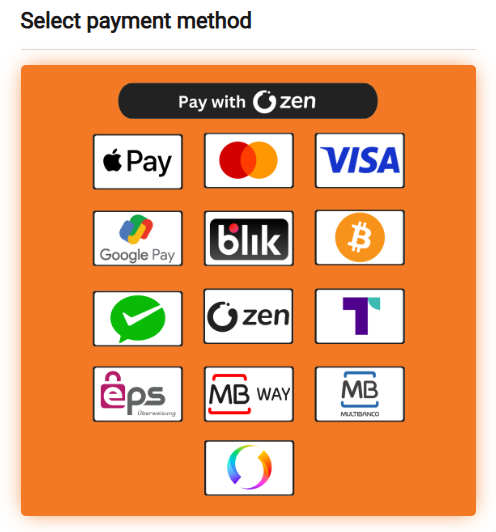
- Proceed to checkout and select ZEN, then Swish as your payment method.
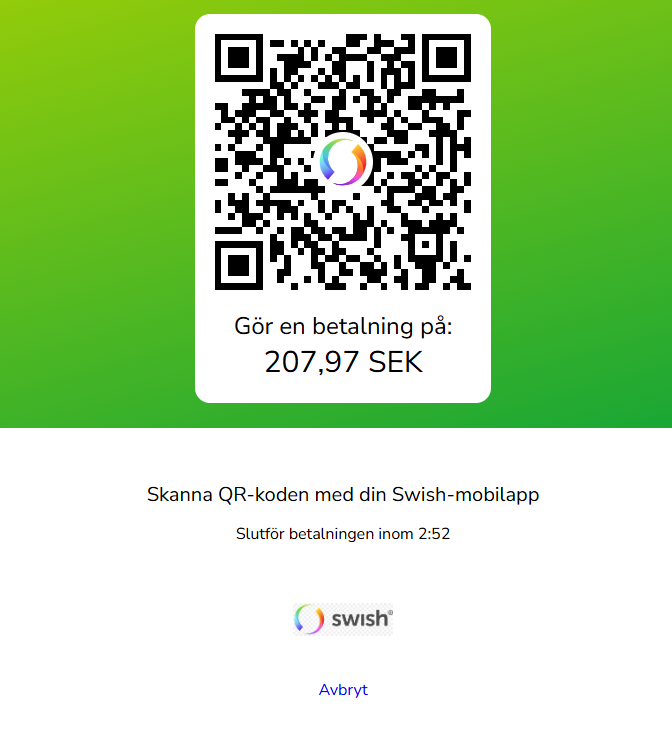
- Scan the QR code shown on the checkout page using your phone's camera or the Swish app.
- Review the payment request and confirm it inside the Swish app.
- Approve the transaction with your BankID or app PIN.
- Receive your code by instant digital delivery, ready to redeem right away.
There is just one problem some first-time buyers run into: scanning the QR code with the wrong camera app. Some phones need the Swish app itself open to scan, rather than the general camera app, so it helps to have Swish open and ready before you reach checkout.
Pricing, Fees, and What You Actually Pay
Pricing transparency is worth spelling out clearly, since it is one of the most common questions we get. The price shown on a Baxity product page is the price of that specific package. If a payment processing fee applies to your chosen method, it is displayed clearly at checkout before you confirm anything, so there are no surprises once the transaction has already gone through. Here is how Swish compares with other checkout options available at Baxity Store:
| Feature | Standard Card Checkout | Swish at Baxity Store |
|---|---|---|
| Card Data Exposure | Card number, expiry date, and CVV are entered directly on the merchant's page. | None. Confirmed with a QR code and your own Swish app. |
| Card-Linking Issues | Some banks have had trouble linking cards directly to certain platform accounts. | Not applicable. Buy a gift card through Baxity Store instead of linking a card at all. |
| Recurring Charges | Subscriptions can renew automatically once a card is linked. | None. A fixed-value gift card ends when the balance runs out. |
| Setup Required | Card issuance, activation, and sometimes 3D Secure registration. | None. Built into the Swish app you already use daily. |
| Best For | Shoppers who already hold and prefer using a bank card. | Swedish Swish users buying gift cards, top-ups, subscriptions, and crypto vouchers without a card. |
Cryptocurrency is also accepted as a payment method at Baxity Store, so Swish users are not the only ones with a card-free option. This flexibility is part of why the platform works well for buyers across such a wide range of countries and banking systems.
Is Swish Safe for Buying Gift Cards?
Swish was built by Sweden's major banks specifically for secure mobile payments, and every transaction requires confirmation through BankID or your app PIN, so a purchase cannot complete without your direct authorisation. Your phone number is linked to the app, but your card and account details are never shared with the merchant's checkout page itself. The main thing worth watching for is anyone asking you to send a Swish payment directly to a private individual in exchange for a promised gift card or game top-up, a pattern common to peer-to-peer scams. Buying through a verified reseller like Baxity Store removes that risk entirely, since your payment goes through a proper checkout, not a private transfer to a stranger.
What to Do If Swish Is Not Working
Payment failures happen occasionally, and they are rarely caused by the merchant. Common causes include an outdated Swish app, a daily transaction limit set too low for the purchase amount, an issue with BankID verification, or scheduled maintenance at your bank. If you run into an issue mid-checkout, try these steps before giving up on the purchase:
- Update the Swish app to the latest version, since older versions can cause QR scanning or confirmation to fail.
- Check your Swish daily and per-transaction limits inside the app's settings.
- Make sure your BankID app is open and working correctly before confirming the payment.
- Switch to an alternative payment method at checkout, such as a card, digital wallet, or cryptocurrency, all of which are supported at Baxity Store.
Frequently Asked Questions
Does Baxity Store accept Swish?
Yes. Swish is available as a checkout option for gift cards, game credits, and crypto vouchers on Baxity Store.
Can I use Swish to buy a Steam gift card?
Yes. Steam doesn't accept Swish directly, but you can buy a Steam gift card at Baxity Store, pay with Swish, and redeem the code into your Steam Wallet.
My bank card won't link to PlayStation Store. Can Swish help?
Yes. If your card won't add directly to a PlayStation account, buying a PlayStation gift card through Baxity Store and paying with Swish avoids the card-linking step entirely.
Can I use Swish to avoid a subscription renewing automatically?
Yes. Buying an Xbox Game Pass or PlayStation Plus gift card with Swish gives you a fixed period of access without linking a card that could renew on its own.
Is Swish safe for buying gift cards?
Yes, every transaction requires confirmation through BankID or your app PIN, and your card details are never shared with the merchant.
Do I need a Baxity account to pay with Swish?
Yes, a verified Baxity account is required to complete any purchase, and it also lets you track your order history from your dashboard.
How long does delivery take after paying with Swish?
Delivery is instant. Once your Swish payment is confirmed, your code is issued digitally and ready to redeem right away.
Are there hidden fees when paying with Swish?
No. The price shown on the product page is the price of the package, and any processing fee is displayed clearly at checkout before you confirm.
Vanliga frågor (på svenska)
Kan jag köpa Steam-presentkort med Swish?
Ja. Steam tar inte emot Swish direkt, men på Baxity Store kan du köpa ett Steam-presentkort och betala med Swish, för att sedan lösa in koden i din Steam-plånbok.
Mitt kort går inte att lägga till på PlayStation Store. Kan Swish hjälpa?
Ja. Om ditt kort inte går att koppla direkt till ditt PlayStation-konto kan du istället köpa ett PlayStation-presentkort på Baxity Store och betala med Swish, helt utan att behöva lägga till kortet.
Vilka presentkort kan jag köpa med Swish på Baxity Store?
Baxity Store accepterar Swish som betalningsmetod för presentkort till Steam, PlayStation, Xbox, App Store, Nintendo eShop, Roblox och många fler, samt vouchrar för kryptovaluta.
Vad ska jag göra om Swish inte fungerar?
Kontrollera att din Swish-app är uppdaterad, se över dina dagliga betalningsgränser och se till att BankID fungerar korrekt. Fungerar det fortfarande inte kan du välja en annan betalningsmetod på Baxity Store.
Är det säkert att betala presentkort med Swish?
Ja. Swish drivs av Sveriges storbanker och varje betalning kräver godkännande via BankID, vilket innebär att dina kortuppgifter aldrig delas med säljaren.
Ready to Check Out with Swish?
Whether you're topping up Steam, PlayStation, or Xbox, buying a subscription, gifting a Nintendo eShop card, or picking up a crypto voucher, Swish gets you through checkout in seconds without a card. Browse the full catalog at Baxity Store, create your free account, and select Swish the next time you're ready to pay.
📚 Related Articles
- How to Pay with BLIK online for Gift Cards & Game Credits
- Buy Gift Cards with Bank in Portugal
- Buy Gift Cards with Bank in Spain
- Buy Gift Cards with Card (Bank Card)
- Buy Xbox Gift Cards with Zen Wallet
- Buy Xbox Gift Cards with AstroPay Wallet
- Buy Xbox Gift Cards with Binance Pay
- Nintendo eShop Apple Pay: Buy Cards Instantly
- Buy Gift Cards with Mastercard
- Buy Gift Cards with eWallet


Comments
Sign in to join the conversation. Every comment is reviewed before it appears on the page.
Sign in to comment
You need an account to leave a comment. Sign in and your name will be used automatically.
No comments yet. Be the first to write one.