There are many ways to buy games and subscriptions for Xbox. But if you value speed and don’t want to enter your card details every time, Google Pay is one of the most convenient payment methods available. What if the Xbox Store doesn’t support it? One simple solution is to buy an Xbox Gift Card with Google Pay through a trusted third-party retailer.
In this article, you’ll learn how to purchase an Xbox Gift Card with Google Pay, why many gamers choose this option, what payment issues you may encounter, and where to buy safely. By the end, you’ll know exactly how to complete your purchase in just a few minutes.
Why Gamers Use Google Pay for Xbox Purchases
There are several ways to pay for purchases in the Xbox Store, but Google Pay offers something many other payment methods don’t: a combination of speed, security, and simplicity. That’s why more and more gamers choose Google Pay on Xbox. Here are the main reasons why this payment method has become so popular.
- Every second counts when you’re ready to start playing. Google Pay lets you complete your payment in just a few seconds. No need to enter your card details every time, no unnecessary verification steps. Simply confirm the payment on your smartphone, and your balance is updated instantly.
- Your money is protected by banking-level security standards. Google never shares your card details with the seller. Instead, a unique token is generated for every transaction, helping protect your payment information.
- Add any credit, debit, or virtual card to Google Wallet. They’ll all be available in one place, allowing you to pay on Xbox with Google Wallet whenever you need. It’s the easiest way to pay for Xbox via Google Pay.
- Convenience. Confirm payments using your smartphone, smartwatch, or even your computer. This is especially useful if you regularly buy digital content from a mobile
- Payments are usually confirmed within seconds, and the system automatically verifies the required information. For gamers, the process is simple: pay, receive your code, redeem it, and start playing.
Even if the official Xbox Store doesn’t support Google Pay, it doesn’t mean you have to miss out on your purchase. Next, we’ll look at the most common reasons why this payment method may not be available and what you can do instead.
Common Problems with Google Pay on Xbox
Google Pay is fast, convenient, and secure. However, not every gamer can use it in the Xbox Store. This payment method may be unavailable for several reasons, and in most cases, they have nothing to do with the user. Let’s look at the most common factors that can prevent you from paying with Google Pay on Xbox.
- Google Pay is not available in every country. The service is officially supported in the United States, the United Kingdom, Germany, France, Canada, Australia, and around 40 other countries. At the same time, it is still unavailable in many parts of Asia, Africa, and Eastern Europe. If Google Pay isn’t supported in your country, you won’t be able to use Google Pay in the Xbox Store. Even changing your account region may lead to additional verification issues.
- Google Wallet. Even if Google Pay is available in your country, the problem may be related to your wallet settings. Your Google Wallet must contain a valid, verified payment card. If your card has expired, is inactive, or requires additional verification, the payment will be declined. It’s also important that your bank supports 3D Secure, which is commonly required for online
- Microsoft Store. The issue may be caused by the store itself. Xbox Store features vary by region, and Google Pay isn’t integrated into Microsoft’s payment system everywhere. Even if you open the web version of the store, this payment option may not appear. For example, some users may not be able to use Google Pay for Xbox Live purchases, depending on their region.
- If you’re buying through the website instead of your console, check your browser first. Google Pay works best in Chrome, Edge, and other Chromium-based browsers. Safari and Firefox may have compatibility issues. Privacy extensions or strict security settings can also interfere with the payment process.
- Your smartphone or other device must support the latest Google services and meet the current system requirements. Older Android versions or devices without Google Mobile Services may not support Google Pay. If you’re trying to top up your Xbox via Google Pay through the web version of the store, make sure your browser and operating system are fully updated.
- Payment verification. In some cases, your bank or Google may request additional authentication before approving the payment. If the verification isn’t completed, the transaction will be declined. It’s also worth checking that your Microsoft account profile contains the correct country and account information, as mismatched details can affect the availability of payment methods.
If Google Pay isn’t available directly in the Xbox Store, there’s still a solution. In the next section, we’ll show you an alternative way to buy an Xbox Live Gift Card and pay for it with Google Pay.
What Xbox Gift Cards Can Be Used For
Google Pay isn’t always available directly in the Xbox Store. However, that doesn’t mean you can’t use it for your purchases. The easiest solution is to buy an Xbox Gift Card with Google Pay from Baxity Store, a verified reseller. This allows you to bypass store restrictions, quickly add credits to your Microsoft balance, and continue paying for digital content using your preferred payment method.
Many users choose Xbox Gift Cards because in some situations they are even more convenient than paying directly with a bank card.
Benefits of topping up with an Xbox Live Gift Card:
- You don’t need to link your bank card to your Microsoft account. This reduces the risk of exposing your payment details or unauthorized charges.
- Budget control. Add only the amount you plan to spend. This helps prevent impulse purchases and overspending.
- One-time use. Once redeemed, the full value of the Gift Card is added to your Microsoft balance, and the card itself can’t be used again. This means there are no automatic renewals or unexpected recurring payments.
- Xbox Gift Cards can be purchased even in regions where Google Pay isn’t supported directly in the Xbox Store.
- A single Gift Card can be used to pay for almost any digital content available in the Microsoft Store.
- No expiration for your balance. Once the funds are added to your account, they remain available until you decide to spend them.
- A great gift. If you aren’t sure which game to choose, an Xbox Gift Card lets the recipient decide how to spend the balance.
📚 Related Articles
- Buy Xbox gift cards with Apple Pay
- Buy Xbox gift cards with Mastercard
- Buy Xbox gift cards with Visa Card
- Buy Xbox gift cards with Crypto
- Buy Xbox gift cards with NETELLER
- Buy Xbox gift cards with Paysafecard
- Buy PUBG Mobile UC with Paysafecard
- Which Xbox Subscription Should You Choose?
- How to get a refund from Steam, Xbox, PS and more?
Now let’s look at what you can actually buy after topping up your Microsoft balance.
- Buy the latest releases, timeless classics, or indie titles and add them permanently to your digital library.
- Xbox Game Pass. Gift Cards can be used to add funds to your Microsoft balance and later pay for an Xbox Game Pass subscription. In addition, separate Xbox Game Pass digital codes are available and activate the selected plan without using your balance. If you plan to use Xbox Game Pass with Google Pay, either option can be a convenient solution.
- DLC and add-ons. Purchase story expansions, new characters, season passes, weapons, skins, and other downloadable content just like any other digital product.
- In-game currency. Fortnite, Apex Legends, Valorant, and many other games use their own virtual An Xbox Voucher makes it easy to add funds without linking your bank card.
- Microsoft Balance. Your funds remain safely stored in your account, allowing you to save them and spend them whenever you like.
- Digital purchases. Movies, TV shows, apps, themes, and other content available in the Microsoft Store. An Xbox Store Card can be used to pay for almost any eligible digital purchase available in your region.
That’s why an Xbox Gift Card is much more than just a gift. It’s a flexible way to pay for Xbox digital content, even when Google Pay isn’t available directly in the Xbox Store. The only question left is where to buy these cards quickly, safely, and at a fair price. Let’s take a closer look.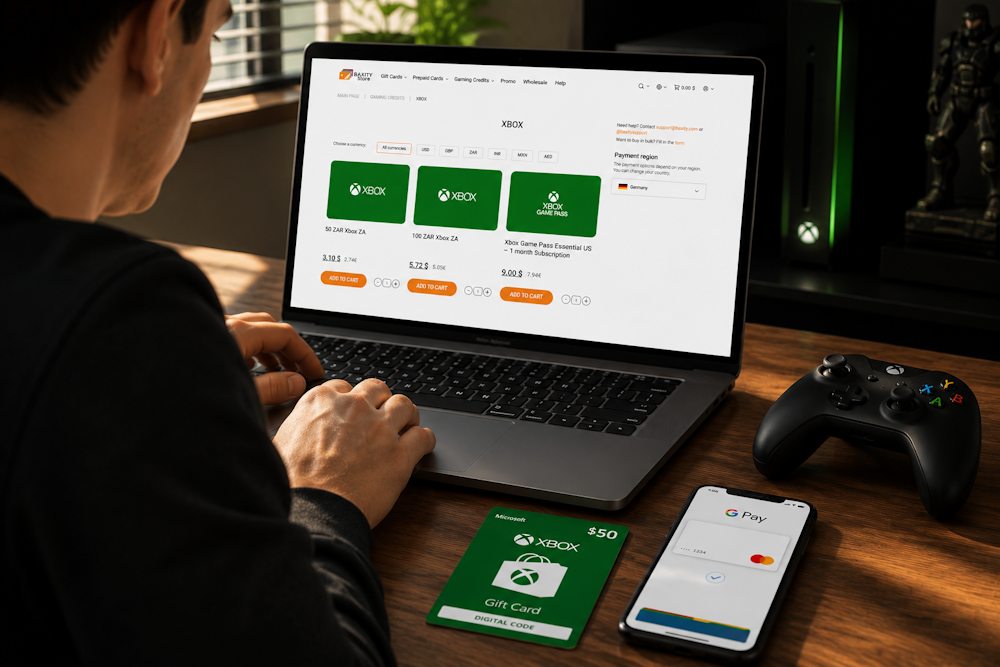
Buying Xbox Gift Cards Through Third-Party Stores
If Google Pay isn’t available in the official Xbox Store, it doesn’t mean you need to look for another payment method. Trusted third-party platforms are a reliable alternative, often offering better flexibility and instant digital delivery. In many cases, it’s easier and more convenient to buy Xbox with Google Pay through a verified reseller.
Unlike random online sellers, a verified reseller guarantees that:
- you’ll receive an original digital code;
- your payment will be processed through secure payment systems.
This means not only a safer purchase but also excellent usability and accessibility for customers from different countries.
One such platform is Baxity Store, which has been operating in the fintech industry for more than 10 years. We are a verified reseller specializing in digital gift cards and vouchers for gamers and many other online services. Our catalog includes gaming cards, prepaid cards, crypto vouchers, and gift cards for a wide range of digital platforms.
- You can purchase an Xbox Live Gift Card even if Google Pay isn’t supported directly in your regional Xbox Store. The platform serves customers in more than 100 countries, making it a convenient solution for international buyers.
Here are the main advantages of shopping with Baxity Store:
- Instant delivery. Your digital code is sent by email immediately after payment. No waiting and no unnecessary delays.
- Secure payments. More than 1,450,000 customers have already trusted Baxity Store with their purchases. Every transaction is protected using modern encryption technologies.
- 100+ payment methods. You can easily buy an Xbox Gift Card with Google Pay. In addition, Baxity Store supports Skrill, NETELLER, Paysafecard, bank cards, cryptocurrencies, and many other popular payment options.
- Simple ordering process. Purchasing takes just a few clicks, with no lengthy forms or unnecessary steps.
- Dedicated customer support. If you have any questions, our support team is always ready to help.
The benefits above make Baxity Store a convenient choice, but for gamers two features matter most: how quickly the code arrives and how many payment options are available. Let’s take a closer look.
Fast Digital Delivery
Getting your code quickly is one of the most important factors for gamers. Baxity Store delivers digital codes immediately after payment confirmation, so there’s no need to wait for hours or complete additional verification in most cases. This makes it easy to buy Xbox online and start playing almost right away.
The store offers Gift Cards in multiple denominations, Xbox Live Gift Cards, and Xbox Game Pass subscriptions, allowing you to choose the option that best fits your needs. Your activation code arrives by email within seconds, making the entire purchase process fast and convenient.
Multiple Payment Options
Google Pay is just one of more than 100 payment methods available at Baxity Store. You can also pay with Skrill, NETELLER, bank cards, cryptocurrencies, and many other popular payment options. This flexibility is especially valuable for international customers, who can choose the method that works best in their country. If you’re looking to buy an Xbox gift online, you can complete your purchase with Google Pay or any other supported payment method directly on the Baxity Store website.
With more than 10 years of experience, a strong reputation, and a wide choice of payment methods, Baxity Store removes the biggest obstacle for many gamers. It lets you safely and conveniently buy Xbox Gift Cards with Google Pay, even in regions where the official Xbox Store doesn’t support this payment method. Next, we’ll walk through the entire purchasing process step by step.
How to Pay for Xbox Gift Cards with Google Pay
Buying an Xbox Gift Card with Google Pay from Baxity Store takes just a few minutes. The process is simple, even if this is your first order. Just follow each step carefully.
- Open the Xbox category. On the Baxity Store homepage, open the Gaming Credits category and select Xbox. Here you’ll find Xbox Gift Cards in different denominations and currencies. Choose the Xbox Voucher that matches your region and preferred value. Keep in mind that some cards are region-specific, so make sure they are compatible with your Xbox account.
- Add the product to your cart. Select one or more Gift Cards and click Add to Cart. Then open your shopping cart to review your order before proceeding.
- Go to your cart and sign in to your Baxity Store account. If this is your first purchase, create an account and complete the short verification This is a mandatory security step that helps protect your purchase. Don’t skip it.
- Complete your order and pay. Click Checkout, choose your payment method, accept the Baxity Store Security Policy, and click Place Order. On the payment page, select Google Pay and complete your Xbox payment with Google Pay by following the payment instructions.
- Receive your digital code by email. Once your payment is complete, your Xbox code purchased with Google Pay will be sent to your email address. Check your Inbox first, and if necessary, your Spam folder. Your code will be ready to redeem immediately.
How to redeem your code
Redeeming your Xbox code takes only a few minutes:
- Sign in to your Microsoft account.
- Open the Redeem Code
- Enter the code you received.
- Confirm the activation.
If you purchased an Xbox Voucher with Google Pay, the funds will be added to your Microsoft balance. If you purchased a subscription code, the selected plan will be activated immediately after confirmation.
Important Things to Check Before Purchase
Before paying for an Xbox Gift Card with Google Pay, take a few minutes to check the details below. This will help you avoid activation issues, payment failures, or problems adding funds to your Microsoft account.
| What to Check | Why It Matters |
| Account Region and Currency | Xbox Gift Cards are region-specific. The card’s region and currency must match your Microsoft account; otherwise, the code won’t redeem. |
| Email Address | Your digital code will be sent to the email address provided during checkout. A typo may prevent you from receiving it. |
| Google Pay Settings | Make sure you have an active payment card linked to Google Pay. Also check that your Google Wallet is properly configured for online and international payments. |
| Internet Connection | A stable internet connection helps ensure successful payment processing and fast code delivery. |
| Product Type | Most Gift Cards add funds to your Microsoft balance, which can later be used to pay for Xbox Game Pass with Google Pay or other digital purchases. Some products have different redemption rules, so always read the product description before purchasing. |
If you plan to add funds to your Xbox balance with Google Pay, make sure your account settings match the Gift Card you’ve selected. Spending a couple of minutes checking the details can save you from activation issues and let you redeem your code immediately after receiving it.
It’s also worth deciding which product best suits your needs before placing your order.
- If your goal is to access the Xbox Game Pass library, paying for Xbox Game Pass with Google Pay is often the better choice.
- If you’re planning to buy games, DLC, in-game currency, or other digital content, an Xbox prepaid card paid with Google Pay is the more flexible option. It adds funds to your Microsoft balance, giving you the freedom to spend them on any eligible digital purchase.
Conclusion
Google Pay makes buying Xbox digital content faster, easier, and more secure. Even if this payment method isn’t available directly in the Xbox Store, you can still buy an Xbox Gift Card with Google Pay from Baxity Store, a verified reseller, and enjoy uninterrupted entertainment without unnecessary restrictions.
Choose the right Gift Card for your region, complete your purchase in just a few clicks, and receive your digital code by email within seconds. Shop with confidence at Baxity Store and get your Xbox Gift Card quickly, securely, and from a trusted verified reseller.
FAQ — FREQUENTLY ASKED QUESTIONS
Can I buy an Xbox Gift Card via Google Pay if my region doesn’t support this payment method?
Yes, this is one of the main advantages of buying from trusted resellers. For example, Baxity Store lets you pay for a card via Google Pay regardless of whether your local Xbox Store supports it. Just make sure to choose a card that matches the region of your Microsoft account.
Can I pay for Xbox Game Pass with Google Pay?
Yes. You can top up your Microsoft balance using a gift card purchased via Google Pay and then use those funds to pay for an Xbox Game Pass subscription. Some platforms also offer separate Game Pass codes that can be paid for directly with Google Pay.
What happens if I buy a card for the wrong region?
Unfortunately, the code won’t redeem. Xbox gift cards are region-locked, and if the region doesn’t match your Microsoft account settings, the system will reject the code. Always double-check the card region before you buy.
How long does it take to receive the code after payment?
With verified resellers like Baxity Store, the code is sent to your email instantly after payment confirmation. In most cases, you’ll receive it within seconds. If the email doesn’t appear in your Inbox, check your Spam folder.
Can I use an Xbox Gift Card on a PC?
Yes. Funds from a gift card are credited to your Microsoft balance, which works across both Xbox and Windows. You can use this balance for purchases in the Microsoft Store on your computer.