For many gamers, paying for Steam through Binance would be the ideal option. After all, cryptocurrency provides freedom from bank cards and extra fees, while Binance Pay ensures instant transactions. However, in practice, the gaming platform does not support direct cryptocurrency payments.
This creates a certain barrier for those who are already accustomed to managing their digital assets without unnecessary restrictions, and requires searching for alternative solutions. The most convenient option in this situation is using digital gift cards, which allow you to buy Steam with Binance without direct cryptocurrency integration into the platform itself.
In this article, we will explain in detail how to top up Steam through Binance in the simplest and easiest way using a gift certificate. You will learn how to instant get funds in your account, avoid common mistakes, and make the process as comfortable as possible. Most importantly, you will understand why thousands of gamers around the world choose this method.
Paying for Steam with Binance Pay: What You Should Know
Binance Pay is a cryptocurrency payment tool designed for fast online transactions without the need for bank cards. It works as a direct payflow between the user and the merchant, which helps avoid additional intermediaries and reduces delays typical for traditional payment systems. This is one of the main reasons why the service has become popular among users who regularly make digital purchases across international platforms.
Another important advantage of Binance Pay is its simplified confirmation process. Instead of entering card details, payments are verified through internal authorization inside the Binance app, which significantly speeds up checkout and reduces the risk of transaction errors. For gamers, this means they can pay for digital content faster and without depending on local banking infrastructure or regional card restrictions.
Because of these benefits, many users expect to pay Steam with Binance Pay in the same way they do on other online platforms. Cryptocurrency transactions make spending more predictable, eliminate unnecessary conversion steps, and provide a more secure payment experience when purchasing digital products.

Key advantages of using Binance Pay for gaming purchases:
- instant confirmation of cryptocurrency transactions;
- no need to use bank cards;
- direct payment between user and merchant without intermediaries;
- a secure way to pay for online digital services.
Despite these advantages, Steam does not currently support Binance Pay as a direct payment option. This means users cannot normally buy Steam with Binance Pay through the platform’s built-in checkout system. As a result, an alternative approach using gift cards becomes the most practical way to keep the benefits of crypto payments while avoiding platform limitations.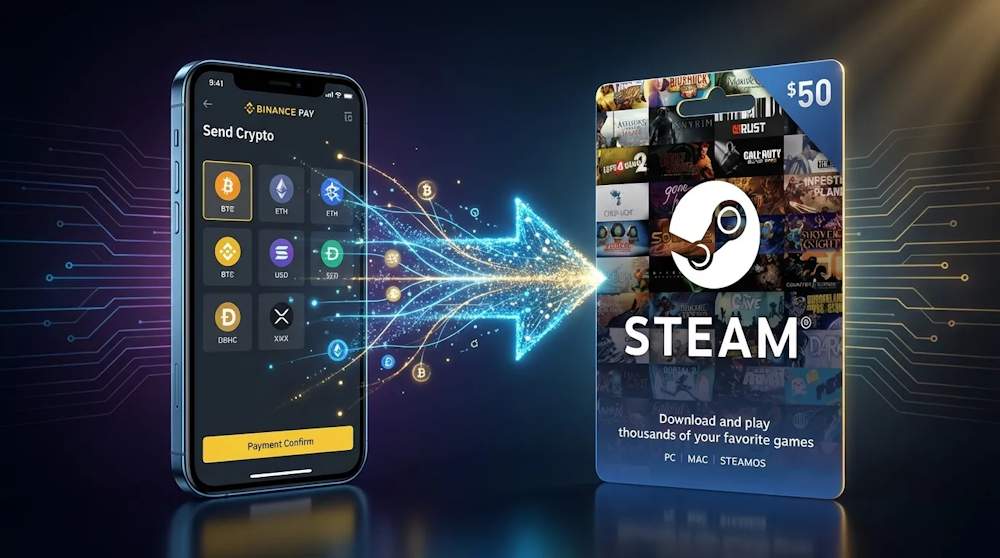
How Steam Wallet Works for Crypto Users
Steam Wallet is the internal balance of a Steam account, used to pay for any content within the platform. Once topped up, the funds are stored as a digital balance, available for instant purchases without re-entering payment details. This allows you to quickly respond to sales, buy new releases immediately after launch, and manage your spending comfortably.
The practical value of Steam Wallet lies in the fact that after topping up, the balance becomes a universal payment tool inside the Steam ecosystem. This enhances account usability: funds are always available for purchases without repeated payment authorization and without dependency on external payment services.
However, Steam Wallet only works with fiat funds and does not accept cryptocurrency directly. This is why a direct Steam wallet top up via Binance is not supported on the gaming platform.
To better understand the role of Steam Wallet in everyday use of the platform, let’s look at what opportunities the balance opens up after topping up:
| Steam Wallet Feature | What It Gives the User |
| Game purchases | Instant access to new releases without re-entering payment details |
| DLC and add-ons | Expanding game content without additional payment steps |
| Steam Marketplace | Buying and selling in-game items |
| Pre-orders | Access to upcoming releases before their official launch |
| Gifts for friends | Ability to pay for games for other users |
This is why gamers look for ways to add funds to Steam via Binance — to combine the flexibility of digital assets with the capabilities of Steam’s internal balance.
📚 Related Articles
- The Ultimate Guide to Steam Problems & How to Fix Them (2026)
- Buy Steam Wallet Credit with Google Pay
- Buy Steam Wallet credits with Apple Pay
- Buy Steam Wallet credits with Mastercard
- Buy Steam Wallet credits with Visa Card
- Buy Steam Wallet credits with Crypto
- Buy Steam Wallet credits with Neteller
- Buy Steam Wallet Credits with Paysafecard
- How to pay on Steam with Skrill
- How to Recharge a Steam Card?
- How to get a refund from Steam, Xbox, PS and more?
- What is a Steam Gift Card?
- Steam Gift Cards FAQs – How to Buy and Redeem
Spending on Games and Add-ons
The main way to spend your Steam Wallet balance is buying games. You can purchase any title from the catalog — from major AAA releases to small indie projects. During seasonal sales (summer, winter, Halloween), prices drop by 50–90%, and your balance allows you to buy significantly more.
What else you can spend funds on:
- DLC (downloadable content)— new story arcs, characters, weapons, maps;
- in-game currency— for CS2, Dota 2, PUBG, Warframe, and other titles;
- pre-orders— get bonus content before the official release;
- seasonal passes (Battle Pass)— exclusive rewards for progression.
If you use cryptocurrency, the most convenient way to top up your balance is through a Steam Gaming Gift Card. This is a certificate you purchase with crypto and then redeem on Steam. After activation, the funds become available for any purchases.
Using Funds Inside the Steam Ecosystem
Beyond the game store, Steam offers several internal services where your balance works just as effectively. The most popular is the Community Market — a trading platform where players buy and sell in-game items: skins, stickers, cases, collectible cards.
What you can do with your balance within the ecosystem:
- buy and sell items on the exchange(Community Market);
- gift games to friends through the gifting system;
- create badges from collectible cards to upgrade your profile;
- participate in trades, exchanging items with other players.
This is where the connection Steam via Binance comes in handy. You top up your balance in advance using cryptocurrency (through a gift card), and then freely manage your funds inside the platform. This gives you access to a full-fledged gaming economy, where your money works not only for buying games but also for trading, exchanging, and developing your account.
Why Binance Pay Is Not a Direct Option on Steam
Steam does not support Binance Pay because the platform only works with fiat money. All payments go through banks, payment systems, and intermediaries that deal with dollars, euros, or other national currencies. Cryptocurrency for Steam lies outside their payment infrastructure.
The reason lies not in account settings or the user’s region, but in the platform’s payment model itself. Steam operates through its own checkout, which only supports integrated fiat payment methods and official gift codes. Therefore, a Steam top-up with crypto via Binance is not an option. You cannot fund your Steam wallet via Binance Pay directly within the platform.
There are several specific reasons why a direct purchase on Steam via Binance Pay is not supported:
- Steam uses local financial providers to process payments;
- cryptocurrency is not part of the platform’s standard payment method list;
- digital marketplace rules vary by country;
- crypto payments require separate integration at the level of Steam’s payment system.
In practice, this means a simple thing: even if Binance Pay is available in your region and works for other online purchases, you cannot use it to top up your Steam balance directly. This is why users need an alternative way to use cryptocurrency for Steam content — and next, we’ll look at how it works.
Using Gift Cards as a Bridge Between Crypto and Steam
Since the platform does not accept cryptocurrency directly, Steam Gift Vouchers have become an alternative way to use crypto assets for topping up an account. Steam gift cards allow users to make a crypto payment from Binance to Steam Wallet without changing how the platform processes payments: you pay with cryptocurrency, and Steam credits your account with the equivalent fiat balance after the code is activated.
How does it work? You purchase a certificate using Binance Pay, receive a code, and activate it in Steam. The platform receives fiat funds, while you get a fully functional balance that can be used for any purchases — games, DLC, or in-game items. That is why buying a Steam Gift Card via Binance has become one of the most stable ways to use cryptocurrency for Steam without relying on bank cards.
Advantages of using a Steam Gift Card via Binance:
- the ability to pay for Steam using Binance Pay with Cryptocurrency;
- instant balance credit after code activation;
- works as a prepaid balance without linking payment details;
- control over top-up amounts through fixed card denominations;
- stable top-up results regardless of regional payment limitations.
For this reason, gift cards remain the simplest way to use Binance for adding funds to a Steam Wallet balance. Next, we will look at how to choose the right card denomination and complete the payment through Binance Pay correctly.
Step-by-Step: Buying Steam Wallet Credits with Binance Pay (Video)
Since topping up Steam directly with cryptocurrency is not possible, using gift cards paid for with Binance Pay remains the most convenient solution. This approach allows you to recharge Steam wallet with Binance quickly, without bank cards or complex intermediary services. The gift card acts as a bridge: you pay for it with crypto, and Steam receives a fiat balance after code activation.
At the same time, it’s important to purchase gift cards only from trusted sellers. A verified reseller guarantees code authenticity, correct denomination, and instant delivery after payment. This is why experienced users choose Baxity Store when they need to buy Steam credits with Binance — without the risk of code blocking or delays in receiving the code.
The purchase process takes just a few minutes and consists of three simple steps:
- choose the Steam gift card denomination;
- confirm the payment via Binance Pay;
- activate the code in your Steam account.
Below, we’ll go through each step in detail.
Choose a Steam Card Value
The first step is to choose the appropriate denomination on the Baxity website. Options range from small amounts for one-time purchases to larger denominations that are more cost-effective during seasonal sales.
- You can buy Steam Gift Certificates in various denominations — from $5 to $200 or more. If you plan to buy games or add-ons regularly, it’s better to choose a larger denomination to avoid repeating the payment each time.
- You can also buy Steam Vouchers for different regions — just select the right option before checkout. Keep in mind that the card must match the region of your Steam account. This is a standard platform requirement that ensures successful activation.
The most important rule: the card’s currency must match your Steam account region, as the balance is credited in the currency supported by the user’s profile. If the currency does not match, the code may not activate. Before proceeding to payment, simply check:
- your Steam account currency;
- whether the denomination matches your planned purchase;
- the card’s activation region.
Then you can move on to confirming the payment via Binance Pay.
Complete Payment via Binance Pay
After selecting the card, the next step is to complete the payment via Binance Pay. It is one of the most convenient options for Binance Pay for gaming purchases, and it also keeps your banking details separate from the gaming platform itself. Before proceeding, make sure you have completed authorization on the Baxity Store website. New users need to register and verify their account — this process is quick but necessary to ensure secure transactions.
Next, follow these steps:
- go to your cart;
- select Binance Pay as the payment method;
- scan the QR code or open the payment confirmation inside your Binance account;
- confirm the transfer in the Binance app;
- receive your digital code instantly after the transaction is completed.
The entire payflow takes only a few seconds. This approach allows users to buy Steam with Binance Pay quickly and conveniently, even if they are using cryptocurrency for gaming purchases for the first time. It is a secure payment method trusted by thousands of players worldwide.
Apply the Funds to Your Steam Account
After receiving the code, the only step left is to activate it in Steam. This takes no more than a minute. How to activate the code:
- Sign in to your Steam account at store.steampowered.com.
- In the top menu, click Account Details.
- Click +Add funds to your Steam Wallet.
- Choose Redeem a Steam Gift Card or Wallet Code.
- Enter the code you received and click Continue.
After that, your Steam Wallet balance will be credited with the card amount. You can immediately use the funds to purchase games, add-ons, or items on the Steam Marketplace.
If you plan to regularly buy Steam credits with Binance, it may be more convenient to purchase several cards at once, choose a higher denomination, or contact our wholesale department if your order includes more than 10 gift cards. This way, you always have balance available when needed and can benefit from additional discounts on bulk purchases.
When to Choose Different Steam Card Amounts
If you plan to top up your Steam Wallet with Binance, the most practical approach is to buy Steam card online via Binance Pay and decide in advance how you plan to use the balance: for a specific game, upcoming seasonal sales, or maintaining a reserve for the Marketplace. This helps avoid unnecessary transactions and makes using gift cards more convenient and predictable.
The most common denomination strategies look like this:
- $5–$10 — suitable for small indie games or in-game items;
- $20–$50 — ideal for purchasing standard game releases without leftover balance;
- $50–$100 — a practical option for seasonal Steam sales;
- $100+ — convenient for regular purchases and maintaining a reserve Steam Wallet balance.
Choosing the right denomination not only helps optimize spending but also makes Steam with Binance top-ups more predictable and convenient for future purchases.
Things to Check Before Paying with Binance Pay
Before paying with Binance Pay, it is worth checking a few basic details that can help prevent delays or transaction errors. This is especially important if you are planning to purchase a Steam Voucher with Binance Pay for the first time shortly before buying a game.
These simple steps help avoid most technical issues when purchasing Steam Gift Vouchers. In particular, make sure to check the following:
- that your Binance wallet has sufficient funds, including network fees;
- that the selected card denomination matches your planned Steam top-up with Binance;
- that the card region matches your Steam account region;
- that your internet connection is stable during payment confirmation;
- that authorization is completed in both your Baxity Store and Binance accounts.
To quickly review possible situations before payment, use this short checklist:
| Problem | What to do before payment |
| Insufficient wallet funds | Check your Binance balance and include network fees |
| Incorrect card region | Select a card that matches your Steam account region |
| Payment confirmation error | Verify authorization in the Binance app |
| Interrupted transaction | Make sure your internet connection is stable |
| Delay in receiving the code | Check your order status in your Baxity Store account |
This short checklist helps make your Binance Pay transaction more predictable and prevents common issues before the funds are credited to your Steam Wallet.
Conclusion
Using gift cards remains the simplest way to combine cryptocurrency with purchases on Steam. That is why a Steam Gift Card via Binance provides a reliable way to handle Steam top-ups with Binance without bank cards or platform limitations.
At Baxity Store, you can safely get a Steam Gift Card via Binance with instant code delivery after payment confirmation. As a verified reseller of the listed brands, we guarantee valid codes, fast processing, and a dependable way to use Steam with Binance for regular purchases.
Choose the denomination you need and top up your Steam balance today with Baxity Store.
FAQ
Can I top up Steam directly with Binance Pay?
No, Steam does not support cryptocurrency as a direct payment method. That is why users typically rely on a Steam Voucher via Binance Pay as an alternative way to add funds without using bank cards.
How long does it take to receive the code after payment?
In most cases, the code is delivered immediately after the transaction is confirmed. Once the payment is completed, it appears in your account and is ready to activate in Steam without any waiting time.
Do I need to register before making a purchase?
Yes, creating an account in Baxity Store is required to place an order. This is a standard step that helps protect your transaction and ensures fast delivery of the digital code after payment.
What should I do if the code doesn’t activate?
In most cases, this means the card’s currency or region does not match your Steam account settings. Check your account region and make sure the card is intended for that region. If everything looks correct, contact Baxity Store support — the team will quickly help resolve the issue.
Can I buy several gift cards in one transaction?
Yes, you can purchase multiple cards with different denominations within a single order. This is especially convenient if you plan to prepare your balance in advance for seasonal sales or regular game purchases.